Student Authored Blog Published by Clemson University’s Office of Teaching Effectiveness and Innovation

Real Stories, Real Students
Hear directly from Clemson students as they share how they navigate, grow, and thrive in their academic journeys. Authentic experiences, candid reflections, and lessons learned along the way.

Anticipated Read Time:
Author: Zuhair A. Adnan
“Time is money.”
Benjamin Franklin
In our very first student blog post, second-year student and OTEI intern Zuhair A. Adnan shares some tips and tricks that have been useful for scheduling and planning throughout his university career at Clemson.
Deadlines can seem like a massive wall to overcome when you first get to university. Not only do you have to get used to a new environment and a new place to live, but you have to track events and deadlines for multiple classes, on top of whatever extracurricular and personal activities you get up to.
For instance, I have to spend over an hour of my day commuting to and from the Clemson campus every day, since I don’t live on campus. How do I handle deadlines if travel takes up that much time? Also, on top of my 15 credit hours, 12 additional hours of my week are tied up in my internship. How do I hold up with the tighter workload?
In this blog post, I’ll be sharing with you some useful tips and tricks that have worked for me and others to manage your time and handle deadlines.
Tips for Creating a Schedule
First of all, the Canvas app has a “To do” section that shows all events and assignments due within the upcoming weeks. (If you don’t have the Canvas app downloaded on your phone, you should download it as soon as possible.)
The current “to do” section is customizable. You can filter it to show only events from certain courses, include personal events, show calendar events, and so on. The list can include events from up to four weeks prior and up to four weeks in the future, depending on how long you want to plan ahead. Note that not all possible events are recorded on Canvas! It’s a very helpful tool, but there are certain things that it won’t track. For instance, an upcoming quiz may not be shown by Canvas in the “to do” page if the instructor hasn’t created an assignment module for it yet.
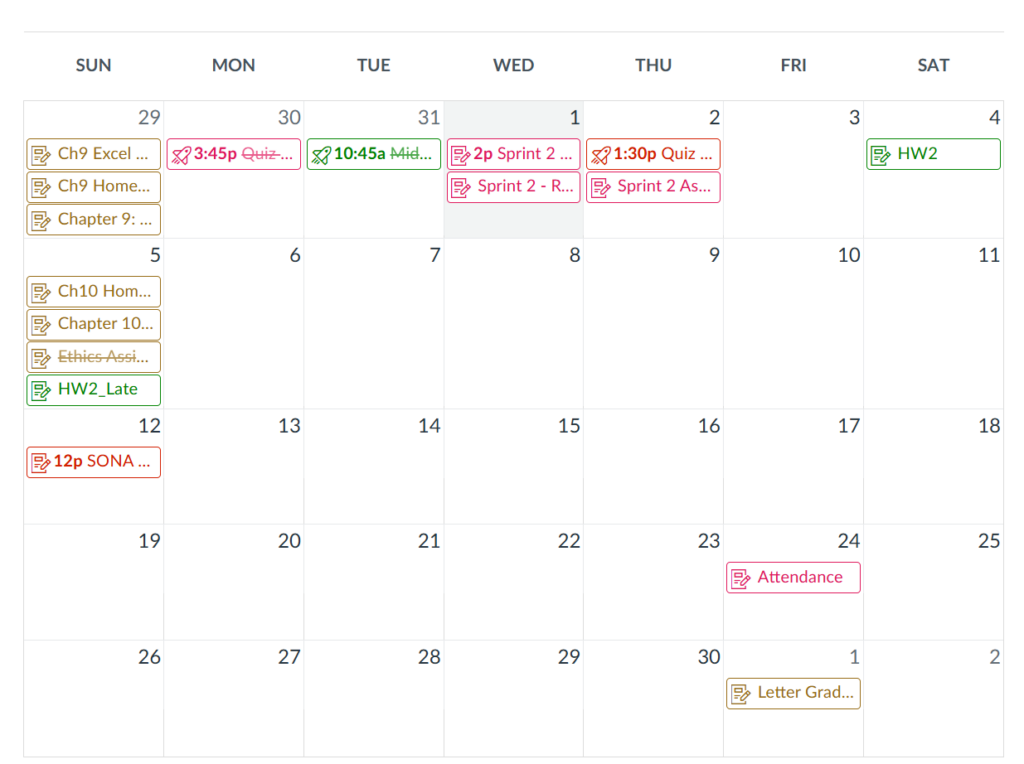
Alternatively, you could look at the Calendar function of Canvas, available for both the web and mobile app versions, which looks like this. Here, you can see all upcoming assignments and events at a glance, and you can filter for specific courses or programs. Completed items will be crossed out as shown here.
Another way I often remind myself of important events is by setting up a reminder for them in the calendar on my phone. Not everyone will be using the Apple calendar app, of course, but virtually every calendar application that exists nowadays has some kind of reminder function. This is one of the most important tools I use to coordinate my activities.
Here’s an example of how I set up events through the Apple calendar. I tap on the date the event is happening, then I tap the “+” sign to add an event and give it a descriptive name. I can set the time the event occurs and up to 2 reminders I will receive for it (at the time of the event, 10 minutes before, 2 hours before, or up to a week before). The reminder times I will select depend on the nature of the event itself.
Of course, some time-bound activities can’t be fully planned for in advance, which is why you should make room for contingencies. One thing that might come up a lot is that you’ll want to schedule office hours (sometimes called “student hours”) with an instructor – to ask about a grade you received, or to ask questions about the course itself. It may be the case that you have ample time to meet the instructor in the middle, but other times you won’t be able to get as lucky.
My advice would be to determine if a given issue warrants office hours. Check your instructor’s syllabus for their communication policy. Is the issue small enough so that it could be handled through an application like Microsoft Teams or email instead?
If you still need to go to office hours after all, then it’s back to the syllabus to see what times your instructor is available and what times align with your own schedule. You’re looking for a double coincidence of wants, when neither of you is tied up with anything else. Do you have to meet in person, or can it be done virtually? Does it have to be set up beforehand, or can you drop in? Will you have to go to a specific location, like the instructor’s office? Is the instructor available to set up appointments outside of their regularly scheduled office hours?
These questions are some of the most important to determine the answers to when setting up office hours. Typically, the best way to answer them is by looking at the syllabus, but you may be able to ask these questions in class (or right at the very start or end). Depending on your instructor’s policies, you may also be able to email them or contact them through Microsoft Teams. Going beyond that, the practice of asking questions about an event or time need is a good one in general, and that brings me to my next topic.
Finding the Time
The biggest piece of advice I have to give you is to think outside the box a little. You don’t always need to stick to a designated “working time”. Any time when you aren’t being productive is a chance to be productive. When you finish this article, think to yourself, “what have I been putting off for a while now?”
The first step is to break down your action items into specific tasks that can be completed. Next, you need to determine what tasks you can get done at what times. For instance, I mentioned that about an hour of my day is spent riding on buses to and from campus. During that time, I might be able to squeeze in some digital textbook readings. But there are also other, more intensive tasks that I can’t easily get done on the bus. If I had to record my voice, for instance, or take a timed quiz, that would be best done when I’m alone in an indoor space with fewer distractions.
Certain aspects about an event that you have to consider include:
- Can I easily estimate how long this will take in the first place?
- When is this due?
- When am I, individually, able to do it?
- What does it entail, and where can I do the tasks it entails?
- Is there a contiguous time limit? (e.g. timed quiz)
- How long will it take?
- Can I easily estimate how long this will take in the first place?
Creating a Routine
It might seem contradictory that I want you to both think outside the box and create a routine for yourself, but it isn’t quite so paradoxical. If you have a routine for when you want to do the work, and you are able to stick to that routine, then that’s some free consistency you’ve just gotten in finishing up your action items right then and there. Of course, building and maintaining a routine is a process all of its own, and I can’t exactly give you all of the answers in a single article, but you should know this to point you in the right direction. The point is: regardless of how spontaneous you are personally, you want some kind of consistency in how you plan to handle assignments.
NEVER wait until the last minute! I don’t know how much I need to stress this, but there is literally nothing lost by starting your assignments earlier than needed most of the time. It might be contingent on not knowing material that hasn’t yet been covered in class, but that’s usually it. Getting assignments out of the way now means more free time in the future, which is usually more enjoyable because there is no deadline looming above your head like the sword of Damocles. I suggest working up to 2 days up to a whole week ahead in advance of deadlines. (Reaching deadlines is a bit trickier when it comes to group work, though, as you aren’t the only one responsible for the advancement of a project. [There may be an article about group work in the future.])
Finally, procrastination. Procrastination is a beast all its own that I could easily spend a whole article talking about as well. In the interest of time and relieving you from boredom, I’ll remind you that the easiest way to avoid procrastinating is as simple as going out and doing it. That strategy has served me well for many years, but there are other ways to get around to things if it doesn’t come naturally to you.
One way to get around to something is to just start working on it for two minutes. Then, after those two minutes are up, you can decide if you want to keep going with the task. This is an effective method because usually the hardest part of a task is just starting it – once you’re in, it’s a greater time investment to get back out. It doesn’t have to be two minutes, either: it could be five minutes, or ten minutes, or in some cases people prefer to do a task for 30 minutes at first. Another method I see works for others is to give a countdown for yourself. Count numbers from 1 to 10 and after the tenth number you just go and do it.
However, that obviously won’t suffice for everyone. On top of the strategy of setting up reminders I mentioned earlier, you could also try using software dedicated to focusing and planning. Here’s a brief list:
- Focus To-Do: I downloaded this app when I was recommended to from a Clemson email. I never used it myself, but it can be really useful for others to create a to-do list and stay focused (well, as the name implies). It also appears to be available on PC in some cases.
- Microsoft To Do: Another productivity app developed by Microsoft for personal focus on both work and play.
- Asana: An application designed for work in teams, so naturally it’s perfect for managing and coordinating group work. Trusted by many of the world’s top companies and even comes with AI integration!
- Notion: A platform for team-based collaboration in wikis, databases, and Kanban boards. (A Kanban board is an organized listing of tasks in the form of cards.) Files can be edited collaboratively in real-time, and Notion is also AI-powered.
Apps like Asana and Notion are helpful for smoothing over internal deadline confusions among team members. And if that list isn’t enough, you could always just look up “productivity apps for college” or something like that.
Conclusion
Deadlines and time-crunches can appear to be one of the hardest things about university, but it can be trivialized through smart work and planning ahead. We’ve looked at various ways to create a schedule for events and determine where to find the time for activities and assignments. We also looked at some ways to handle procrastination: never wait until the last minute! Finally, we saw some ways technology can help us become more productive in our day-to-day lives.
I hope these strategies help you to navigate your way around university life! And, once again, ask yourself:
“How can I be a little more productive right now?”
Published on:
Authored by: Z. Adnan
Blog Post Created by: Z. Adnan and S. Otterbeck, Ph.D.
