CCIT News and Notices

SEO Poisoning

Have you ever searched for something on the internet using your favorite browser search engine and gotten results that are completely wrong? For example, you search for your specific car insurance company’s official website. However, the top results you see may list the name of your car company, but the website URL is not your company’s official website.

These types of results can be caused by Search Engine Optimization (SEO) Poisoning. In this type of attack, cybercriminals employ various methods to manipulate search engine results, attempting to redirect traffic to their malicious websites. On these fake websites, users may be prompted to enter their personal account credentials, which the attackers will steal, or the fake sites may include malware that is unknowingly downloaded to the user’s computer.

To avoid SEO Poisoning:

  • Always visually verify links before clicking. Examine the URL carefully. Look for name misspellings or letter substitutions in the domain name. Double-check that the domain extension (.com, .edu, .gov, etc.) is correct.

  • Be skeptical of the top results. Many of the first results are often “sponsored” results, meaning that they are paid to be listed first, regardless of your actual search results.

  • Go directly to official websites. If you know the URL of the actual website you want, such as Amazon, then type “amazon.com” directly into the browser address bar, rather than searching for “Amazon”.
Woman holding phone with text displayed over image saying "Search Engine Poisoning" and a poison symbol.

Online Holiday Shopping Tips from CCIT

An older woman shops on a laptop while holding her phone, with holiday decorations in the background.To help promote awareness during the holiday shopping season, the CCIT Office of Information Security would like to share some safe online shopping tips.  Best wishes to all during the upcoming holidays!

For more tips about staying safe online (and beyond), visit the CCIT Cybersecurity page.

Shop at secure websites that you trust

Play it safe by doing online business with trusted retailers you have shopped with before.  If you are tempted to buy from a new website, research the company name before providing your payment information.  When making credit/debit card payments look for website addresses that start with HTTPS and have a lock icon, which indicate a secure website.

Avoid public Wi-Fi

You might be tempted to shop online at a coffee shop or other location with free Wi-Fi.  Browsing the websites may be acceptable, but do not make credit/debit card payments from a public Wi-Fi unless you have started a VPN (Virtual Private Network) session from your device.  VPN creates a secure tunnel, making your data safer from interception by nearby hackers. Clemson has a free VPN you can use with your Clemson username, password and Duo authentication. You can find more information in our Services section, and if you’re using a computer, you can find step-by-step instructions in our Knowledge Base.

Create strong, unique passwords

Use a unique pass phrase for each website, and keep it private.  Do not use your University password when creating accounts with online merchants.

Beware of fake delivery notifications

With packages often delayed, be wary of fake shipping alerts. Don’t click on links from delivery notification emails or texts you aren’t expecting, especially if they require “verification” from you. Visit the delivery company or vendor’s website to track your package safely.

Watch out for email scams

Holiday deals presented via email are tempting, but if the advertisement seems too good to be true, it probably is. Instead of clicking on an email link, view information directly from the merchant’s website. And don’t forget, if you get something that looks like an email scam in your Microsoft Outlook, report it to CCIT with our button.

Don’t give out too much information

Merchant websites should never prompt for your social security number.  Other than your shipping address and phone number, be very wary when asked for personal information.  Call the customer service line when in doubt.

Check your statements and take action immediately

Regularly check your bank and credit card statements for unauthorized transactions, and set up account activity alerts wherever possible.  If you suspect a fraudulent transaction has occurred, immediately contact your bank or credit card company to report the unauthorized activity.

Know how to spot a package delivery scam

Scammers are sending fake delivery notifications claiming a package can’t be delivered, then directing victims to click a link or submit personal or payment information. These messages often look legitimate but are designed to steal credentials or financial data. Learn how to recognize these scams and always verify delivery claims through official carrier websites.
CheckIT updates to further streamline the technology governance process

Clemson University’s technology governance process, CheckIT, continues to evolve to better serve faculty, staff and researchers as they evaluate, purchase or renew technology solutions.

University employees are reminded to complete the CheckIT process before making any purchase or contract commitment. Submitting a request after a purchase has already been made can lead to delays, unplanned costs or—in some cases—inability to approve use of the product.

To help ensure timely approvals, CCIT also encourages the actual user or project owner, rather than an administrative assistant or proxy, to submit CheckIT requests. The person who will be using the software or service is often best equipped to answer the technical and usage questions that determine risk and compliance. Requests submitted by individuals without the necessary details slow down the process for everyone.

Recent updates include an expanded exceptions list, particularly benefiting faculty using free research applications on the Palmetto Cluster. If you are in doubt about whether to submit a solution for review, please reach out to itgov@clemson.edu.

Finally, campus users should begin preparing for the end-of-year freeze period in mid-December through the first week of January. New requests during this time will not be processed until the new year.

For more information, including the updated exceptions list and submission guidance, visit clemson.edu/ccit/checkit.

Shred Your Documents At A Free Campus Event

On Monday, November 17, 2025 the thirteenth annual Shred Bowl event returns to Clemson University’s campus. This document shred day is a free opportunity for Clemson staff, faculty, students and community members to bring their documents to be destroyed in a safe environment. Document shredding is another way to protect important personal information and is a strongly encouraged best practice. Please note that this event does not include official Clemson University records. Faculty and staff are encouraged to follow the guidelines from Records Management for guidance on any official University records.

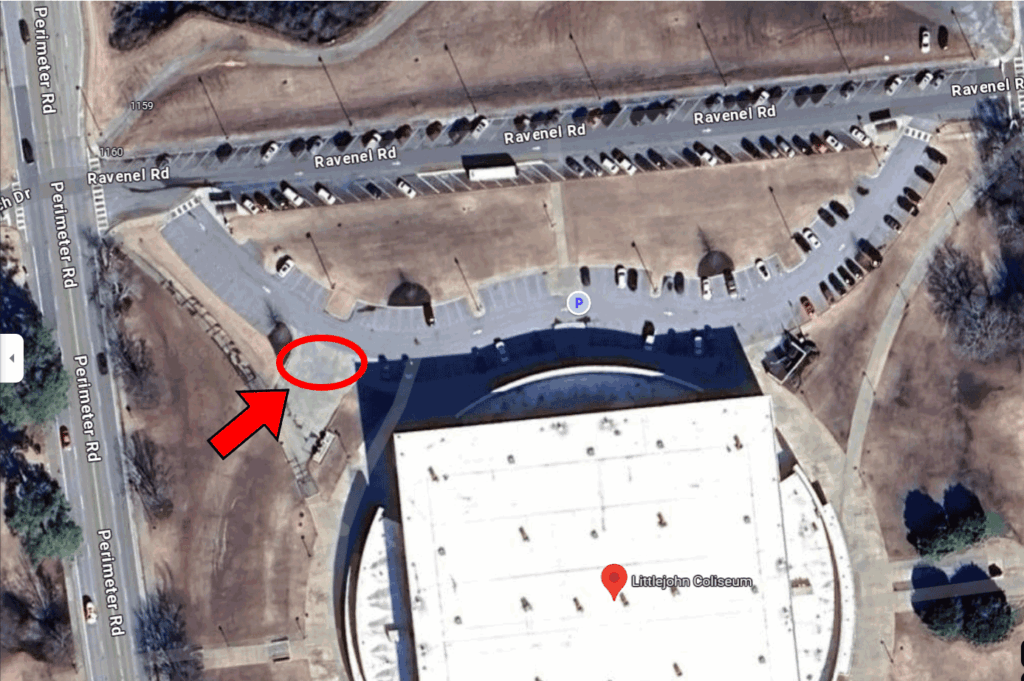
This year’s event will occur in the Littlejohn parking lot between 10 a.m. and 2 pm. (219 Perimeter Rd, Clemson, SC 29634). Each vehicle is limited to three (3) boxes (copy paper box or smaller) or three (3) bags (kitchen trash bag or smaller). It is not necessary to remove binder clips, binders, paper clips, rubber bands, or staples. The image below shows where the shred truck will be located:

For more information about this year’s Shred Bowl with Shred 360 event, please visit this link.
