After February 2, the Duo Mobile app will not work for users who have not updated to version 4.85 or newer. Students, faculty and staff should ensure their app is up-to-date to avoid losing access to Clemson systems. Instructions to update your Duo Mobile app are available on the CCIT blog.
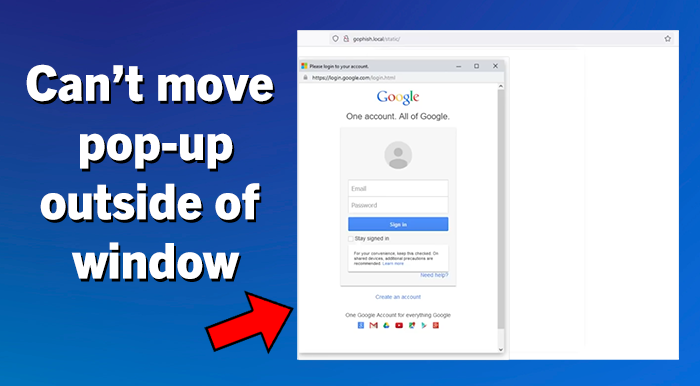
There has been an increase in cybercriminals using the Browser in the Browser (BitB) trick to steal login and password information. This trick has become more common on social media platforms such as Facebook and Instagram, but it can be used in any environment that uses a login page.
Research, Computing and Data will host workshops this semester! Join the RCD team and expand your knowledge of high-performance computing and research resources available to you. The next workshop is “Introduction to Nextflow” on Tuesday, January 27 at 11 a.m. Registration is required; open to all Palmetto users.
The popular GIS Fundamentals Workshop Series continues this week! This 6-workshop series held on Friday mornings is streamlined to cover the GIS fundamentals; no prior experience is necessary. In-person sessions began January 16 or join online sessions starting February 27. Note: Attendance at the first two workshops is mandatory to participate in the remaining sessions.
A great New Year’s resolution: learn a new skill! Clemson faculty and staff have free access to Percipio, which offers thousands of courses, books, audiobooks and more to boost your professional development in a wide range of topics.
Clemson University uses the Duo Mobile two-factor authentication (2FA) app to ensure security and privacy of University information and systems. Beginning February 2, Duo is ending support for older versions of the Duo Mobile app to improve security and performance. After this date, versions of the Duo Mobile app earlier than version 4.85 will not work to access Clemson University systems that require 2FA.
Any app that is not updated by February 2 will lose the ability to authenticate and users will be locked out of Clemson services such as Canvas, iROAR, VPN and Kronos.
To continue accessing Clemson systems that require 2FA, faculty, staff and students must update the Duo Mobile app or set up an alternate authentication method.
What to do:
Check your device. Phone must meet these minimum requirements to support the latest version of Duo Mobile:
Apple devices: Go to Settings > General > About > iOS Version. Verify iOS 16 or higher.
Android devices: Go to Settings > About Phone > Android Version. Verify Android 11 or higher.
If a phone can’t upgrade to at least iOS 16 or Android 11, other options are:
Using another smartphone or tablet that meets requirements for Duo Mobile.
Contacting the CCIT Support Center to discuss and set up other authentication options such as:
Platform authenticators like Windows Hello or Apple TouchID
Passkeys in password managers like Keeper, 1Password or Google Password Manager
Hardware token ($20 cost)
Updating now ensures uninterrupted access to Clemson systems.
If faculty, staff or students have questions, need help updating or their device cannot be upgraded, visit the CCIT Support Center on the second floor of Cooper Library, email ithelp@clemson.edu or call (864) 656-3494.
There has been an increase in cybercriminals using the Browser in the Browser (BitB) trick to steal login and password information. This trick has become more common on social media platforms such as Facebook and Instagram, but it can be used in any environment that uses a login page.
The BitB trick uses hidden code to create a fake pop-up looking window in your browser with a login prompt. Because the fake pop-up is entirely generated, it can include a convincing-looking address bar at the top that displays correct domain names. This trick can easily fool users who are looking at the URL before entering their credentials. For example, the BitB trick could be showing what looks like a pop-up window for a Google login and include the correct google.com address as well as all of the correct graphics and formatting. After entering your credentials, the user may even be redirected and logged into the official website. But through this process, the cybercriminal also collected and saved the user’s login and password information, which they can use themselves later. Most login pages are static single pages and do not typically have their login screen in a pop-up window. One of the best ways to spot this BitB trick is that the pop-up window cannot be moved outside of the original main browser window.
Ways to Avoid the BitB trick:
For logging into any account, don’t trust a button, page link or email link. Instead, navigate to the site’s official website URL in a separate browser tab to login.
If you are prompted to enter credentials into a login pop-up window, first check to see if the pop-up window can move outside of the browser window. Essential for the BitB trick, are iframes, which are connected to the underlying browser window and cannot be pulled outside it.
It is also recommended to use Two Factor Authentication on any account, when available, to give you an extra layer of protection.