Cybercriminals are leveraging the high interest in artificial intelligence (AI) tools as part of new targeted campaigns. These often appear as “free” AI tools or in false advertisements that link to sites impersonating an official AI site.
If downloaded, the fake AI tool will include a ransomware executable, which will encrypt files and demand payment to unlock the user’s content.
Here are some tips to help avoid falling for this scam:
Only download from official websites. Always examine the URL carefully.
Be suspicious of “free” tools or offers that seem too good to be true.
Research a company or product first before downloading anything.
Scan files with security tools before opening them.
If you need assistance with downloading AI tools, please contact your Clemson University IT Consultant.
Proofpoint has recently discovered a new attack vector that cybercriminals are using to compromise users’ computers. In this scheme, users are prompted with a notification pop-up on a webpage, in a Word document or when opening a PDF file, saying that there is a problem. And the notification will include a button saying something like “How to Fix” or “Auto-Fix”.
The fake instructions for how to “fix” the problem will typically ask the user to copy and paste some code into Windows PowerShell or the Run dialog box. Because this code is only being copied and pasted, most antivirus software will not have an opportunity to inspect and catch the malicious code. Once this code is run by the victim on their computer, it triggers the download of additional malware and other nefarious activities.
Clemson University users should exercise caution if presented with this error, and it is recommended to reach out to the area’s IT Consultant for assistance.
A new vulnerability in Apple’s AirPlay has been uncovered by Oligo Security Research that could potentially allow bad actors to compromise devices such as your Mac laptop, AirPlay speakers and receivers, or even the CarPlay system in your automobile.
Because of this vulnerability, users could experience a denial of service, loss of sensitive information, or possibly distractions while driving in the form of unwanted sounds or images being displayed on your automobile console.
To help protect yourself against this vulnerability:
Update any device that supports AirPlay to the latest version of the software available.
Verify on your AirPlay device that the setting “Allow AirPlay for” is set to just “Current User.”
Disable the AirPlay receiver on any device where it is not needed.
Clemson users are seeing an influx of QR Scam emails. In these emails, like the one below targeting employees referencing a Compensation Guide, the recipient is given a QR code to scan with their phone.
But if a user follows the link from the QR code, they are presented with a fake login page which will steal the user’s login and password account information. The cybercriminals are hoping that you will be less protected and have limited information by moving you to your phone.
Some of these fake QR code emails claim to be from Microsoft, while others are targeting students with fake job opportunities.
You should always check the sender’s email address before following any link or QR code. Any official email from Clemson will have a clemson.edu address.
If you receive a suspicious email with a QR Code, use the Report Phishing button in Outlook to have the Clemson Security Operations Center review and investigate the email for you.
Clemson users should be aware of another targeted phishing campaign. This one claims to be a University Supported Program and offers to help staff and students with financial support.
Below is an example of one of these types of emails.
Users are prompted to follow a link within the email, which takes them to a login page that asks them to enter their email address, username and password. They are hoping that you will enter your Clemson account information.
But this is actually a scam designed to steal users’ credentials. If you receive an email similar to this, you should report it using the Report Phishing button in Outlook or by forwarding it to phishing@clemson.edu.
Since ordering and receiving packages has become commonplace for most people, cybercriminals are trying to take advantage of this practice. One of the ways they do this is by sending you a package with an item from a common online retailer, like Amazon, that you never ordered.
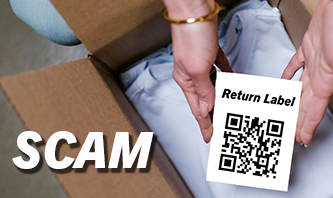
This is also known as a Brushing Scam. But the new twist on this scam is that inside your package you will find a QR Code with instructions on how to return the item or to find out more details about the order. Because this item was something that you didn’t actually order, they are hoping that you will scan the QR code that is included in the package.
These QR codes typically take you to a phony website that may load malware on your phone, which could compromise your device, or even steal your information.
For any package return or to get more information about an order, a safer solution would be to go to the vendor’s website yourself by typing in the actual address, rather than trusting a QR coded link. Once you are on the actual vendor’s website, you can check for details on the order or how to legitimately return an item if needed.
But if this was not an item you ordered yourself, then you are not obligated to return it. And you can simply keep it or throw it away.
Here are some tips to help avoid falling for this scam:
Preview the URL for any QR Code before doing anything When you scan a QR code with your phone’s camera, it will display the website URL from the QR code. You should look carefully at the URL to see if it matches the official website. And beware of any tricky or misleading letter substitutions in the URL, which may make it similar to the real website address.
Never download a QR Code Scanning App You should only use your phone’s camera to scan a QR code. If you are prompted to download any other tool to view the QR Code, this could be another way that scammers can infect your phone with malware.
If you follow the URL from the QR Code, look for any suspicious signs on the website Verify that the URL is an HTTPS address and not just an HTTP address. Look for things like low-resolution graphics, misspellings, grammar errors, or anything that looks out of place. Also, be extra cautious if the website asks for any personal information, account login and password data, or credit card information.
Users should beware of a current “Update your Browser” type scam. In this scam, cybercriminals will display a full-screen web page or pop-up window with a fake notification saying that your browser is out of date and needs to be updated. The phony page will also include a button to download the supposedly needed update.
If a user clicks on that link, they will actually install malware on their device that the cybercriminals can use to steal data or take control of that device.
When a legitimate web browser update is needed, this is typically done automatically when the browser is started. It is also important to remember to completely close and shut down your browser after each session, as well as reboot your computer on a regular basis. You can also verify if any browser updates are needed by checking the settings section in your browser.
Clemson users can contact the CCIT Support Center for additional help.
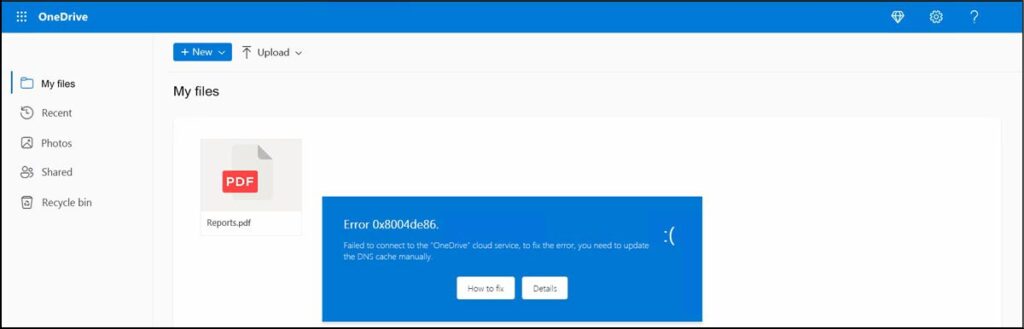
In this campaign, users receive an email that contains a .html (web page type) file. When that file is opened, the user will see something like the image below, which simulates a Microsoft OneDrive page with an error message.
The blue fake error message pop-up will say that there is a DNS issue with the user’s OneDrive. And the error display has two buttons. The “Details” button will actually take users to the real Microsoft web page for troubleshooting a DNS issue. But if a user clicks on the “How To Fix” button, it will launch a JavaScript program embedded within the HTML file. That JavaScript will display additional misleading instructions for the user. If followed, the result will be unknowingly downloading malware onto the user’s computer.
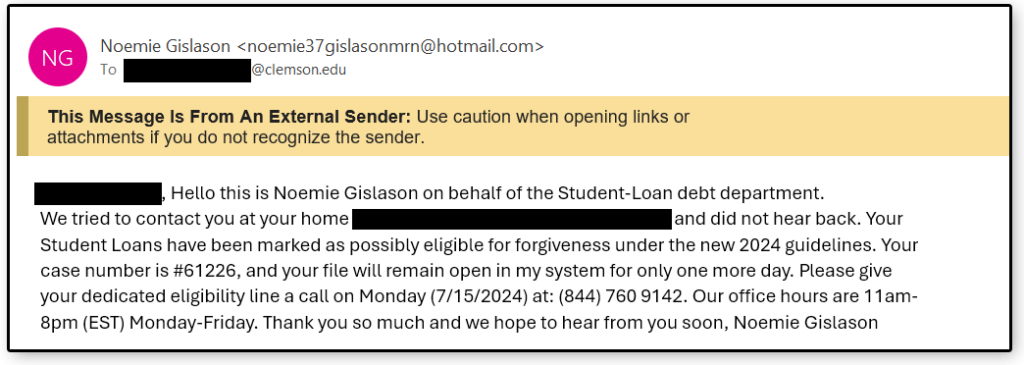
Clemson students are being targeted with a new phishing email that references paying off Student Loans. One unique element of these emails is that they contain the student’s name and their home mailing address. These phishing emails were sent to students via their g.clemson or clemson.edu accounts.
Students are prompted to call a phone number that would most likely result in being asked to verify some more personal information which the cybercriminals could also use as part of their scheme. Typically, their goal is to steal money.
There were several indicators that this was not a legitimate email:
The sender’s address is a generic Hotmail account.
It has a “too good to be true” theme.
There is also a sense of urgency prompting users to respond quickly, which is a common tactic because they are hoping that you won’t be thinking clearly if you are in a hurry.
If students receive an email like the one below, they should report it by clicking on the “Report Phishing” button in Outlook or forwarding it to phishing@clemson.edu.
Clemson University is seeing an increase in voice phishing, also known as vishing. Vishing is a social engineering tactic done through phone calls where the caller uses deception and manipulation.
The goal of the vishing phone call is to pose as someone they are not and then to gain access to someone’s account or service. Once the cybercriminals have access to your account, they can change passwords to lock you out of your own account as well as transfer data or even funds from your financial institution.
For example, you may get a call from someone saying they are from your bank, and that they are seeing some potentially fraudulent charges on your credit card. Then, they may ask you to verify some of your information, such as your mailing address, birth date, or account number. Once they have some of that key information, they could then call your actual bank and claim to be you. When your real bank asks for some of your personal information to verify that it is really you calling, the cybercriminals can provide that information because you just gave it to them.
Another example would be someone calling a Support Desk asking for help in resetting their password. When the support person asks them to confirm their identity by sending something to the user’s phone, the fake caller could make up some excuse about how they lost their phone, which is why they are calling to reset their password. The Support Desk employee who is trying to be helpful may then let them skip that step. The cybercriminals sometimes will even research personal details on their victims from social media to help them answer other key information if asked.
To help reduce the risk of becoming a victim of vishing, it is recommended that you don’t answer calls from unknown numbers on your personal phone. If you do get a message or call claiming that there is an urgent issue, like an alert from your financial institution, a billing issue from a service that you use, a family medical emergency, or even someone asking you to do something for them, don’t necessarily trust the validity of that call.
It is always better to verify the information yourself. Hang up from that call and then call the institution, service, or person who supposedly just called you to verify whether the issue is legitimate. Don’t trust that the caller is who they say they are. And verify first, before giving any information or taking any action.