CCIT News and Notices

Changes to Clemson Email Quarantine

Clemson University employees, staff, and students who use Microsoft Outlook for email have likely noticed that some of their emails get held in quarantine. The quarantine function is part of the University’s security toolset providing proactive, immediate security for the more than 2,300 phishing and scam attempts the University receives by email each month.

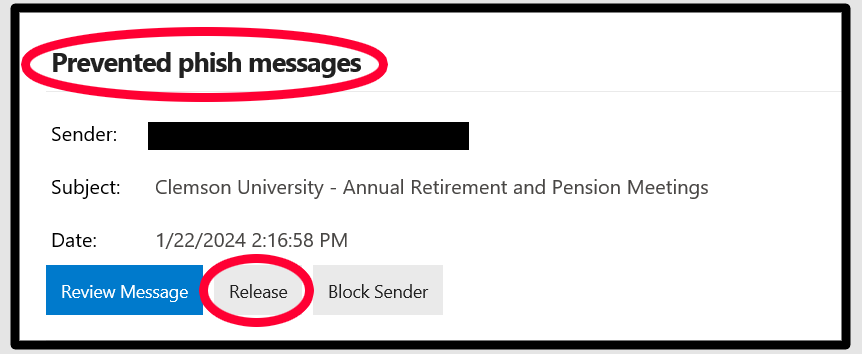
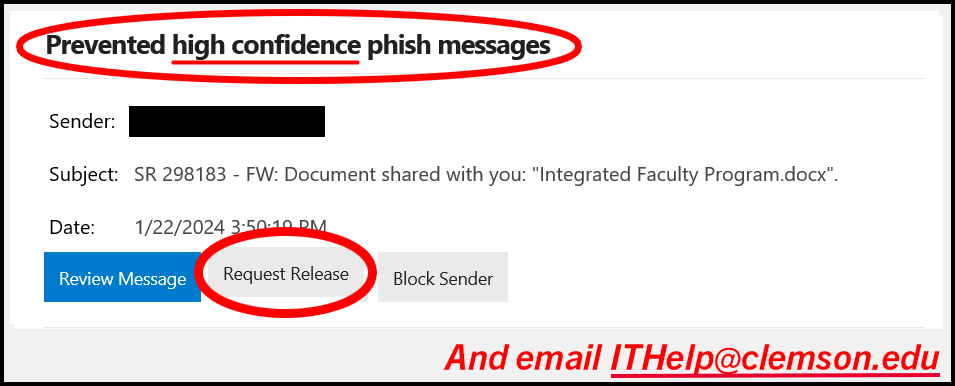
Beginning on Monday, February 26, 2024, faculty, staff, and students who receive email notifications about a “high confidence” phishing email that has been quarantined will be required to take an extra step if they would like to release that email back into their inboxes. This change involves clicking the “Request Release” button in the notification email, followed by emailing ithelp@clemson.edu to start a service ticket for the release. This change does not apply to regular quarantine emails, only those labeled as “high confidence.” The extra step further ensures the CCIT Security Team can inspect and verify if an email is malicious and should not be released. Failure to submit a ticket for a release request will result in no email release, so this step is important. Again, those with regular quarantine emails who would like to release emails back to their accounts should continue to use the regular Release process.

Helpful screenshots of this change and process are outlined below:

  • If you receive a regular Prevented type quarantine email similar to the one below, you can still click on the “Release” button as normal. No additional steps are required.
  • If you receive a High Confidence type quarantine email like the one below and would like the email to be released to your inbox, you will need to click the“Request Release” button and also email ithelp@clemson.edu to request the release of that message. Please include the subject line of the email you wish to release in your ITHelp email request.

If you have any questions about this process, please contact the CCIT Support Center at ithelp@clemson.edu or (864) 656-3494. Thank you for helping in keeping Clemson even more secure!

Check the Status of University Systems on Status Hub

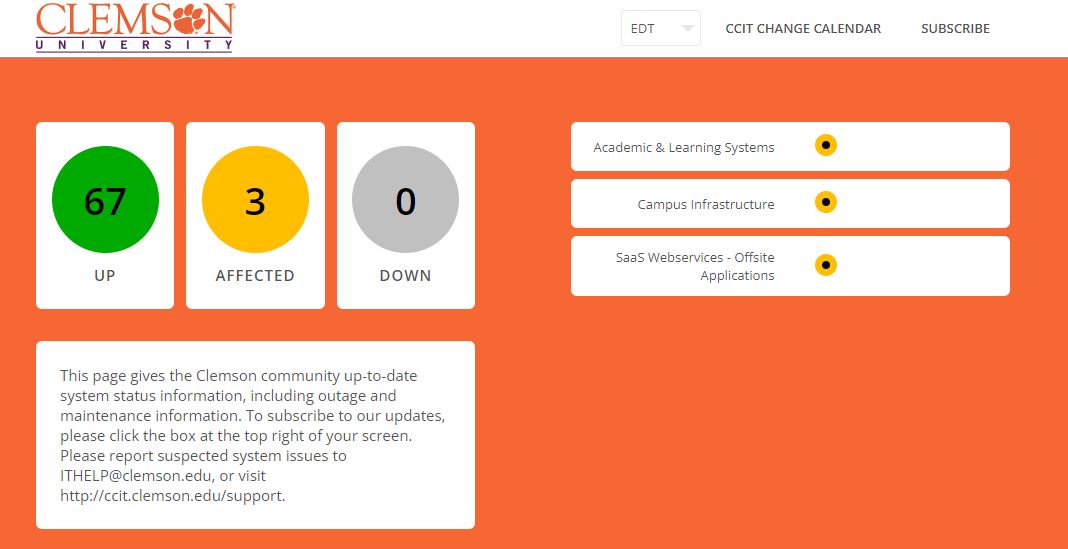
As the campus community returns, university systems have the potential to function more slowly or not at all. If you encounter a lag, slower service, or difficulty accessing services like Wi-Fi, Canvas, and more, updates on university systems are made in real-time on the CCIT Status Hub. All campus community members are encouraged to subscribe to Status Hub by clicking the “Subscribe” button in the top right corner. Once you enter your information, you can select options for text messaging or email updates and will receive information as it happens for university systems. You may also opt-in for messaging specific to particular systems (alerts for Canvas only, for example). If you are experiencing an issue and Status Hub does not reflect this, you are encouraged to contact the CCIT Support Center at ithelp@clemson.edu or call (864) 656-3494.

image shows an example of the Status Hub homepage, with an orange background and buttons of green, yellow, or gray based on number of systems running or degraded

FCC/FEMA Emergency Alert System Test on October 4, 2023

On Wednesday, October 4, 2023 at 2:20 pm EST, the Federal Communications Commission (FCC) and Federal Emergency Management Agency (FEMA) will test the Emergency Alert Systems on mobile, radio, and television devices. The Clemson University community is advised to be aware that at this time, an alarm will sound on all devices turned on.

According to a joint press release by the FCC and FEMA, mobile devices will receive a text message with an accompanying alert sound that reads: “THIS IS A TEST of the National Wireless Emergency Alert System. No action is needed.” This alert is scheduled to last from 2:20 pm to 2:50 pm EST.

For radio and television, the emergency message will last approximately one minute and will have the alert sound and accompanying message: “This is a nationwide test of the Emergency Alert System, issued by the Federal Emergency Management Agency, covering the United States from 14:20 to 14:50 hours ET. This is only a test. No action is required by the public.”

Click here to learn more about this alert and remind students, faculty, and staff not to be alarmed when the message arrives on Wednesday, October 4, 2023.

Campus Network and TikTok – July 10, 2023

To protect the integrity of information and resources connected to the Clemson network, TikTok will no longer be accessible through the campus network (both wired and Eduroam Wi-Fi), effective Monday, July 10, 2023.

Faculty, staff, students, and visitors with personal devices may still access the application on their private carrier data networks.

This step allows the University to protect institutional resources and information while safeguarding the privacy of a wide variety of devices connected to the Clemson network.

We will continue to monitor updates related to this app and provide subsequent information as needed.

Kronos to Require Log-in through Duo Mobile Application on July 21, 2023

Effective July 21, 2023, Kronos, Clemson’s timekeeping/leave tool, will move to single sign-on with two-factor authentication through Duo mobile to log in. Kronos tracks employees’ worked time, leave requests, and allows supervisors to approve timecards and leave. 

Duo offers two-factor authentication (2FA) to ensure only authorized individuals can access your information.

Several Clemson systems already require single sign-on with 2FA, and this new addition of Kronos will not require any extra steps for individuals who already have the Duo mobile app installed and registered.

If this is your first time using Duo, if you need to reactivate Duo, or if you need to manage your registered devices, please go to CCIT’s 2FA Webpage. CCIT also has a “Frequently Asked Questions” page on 2FA with Duo. 

The single sign-on and Duo process will be implemented the evening of July 21, making Kronos temporarily unavailable between 5 and 7 p.m. When the system returns online, Duo will be required to access Kronos.   

Security Upgrades to Impact Email Spam Retrieval Beginning July 12, 2023

Beginning Wednesday, July 12, 2023, CCIT will start the two-week process of changing to a new Microsoft cloud-based spam filter for those with @clemson.edu email accounts. This new service offers the same features currently implemented with our on-campus service with minimal changes and heightened security.  

When encountering email marked as spam, accounts may notice the following:  

  • You will continue receiving yellow warning banners on messages from external senders or scenarios that might have extra precautions.  
  • Email links will be protected via Safelinks rather than URL Defense, and URLs may be rewritten. For example, old URLs might have started with “https://urldefense.com” and will now appear as “https://nam12.safelinks.protection.outlook.com”  
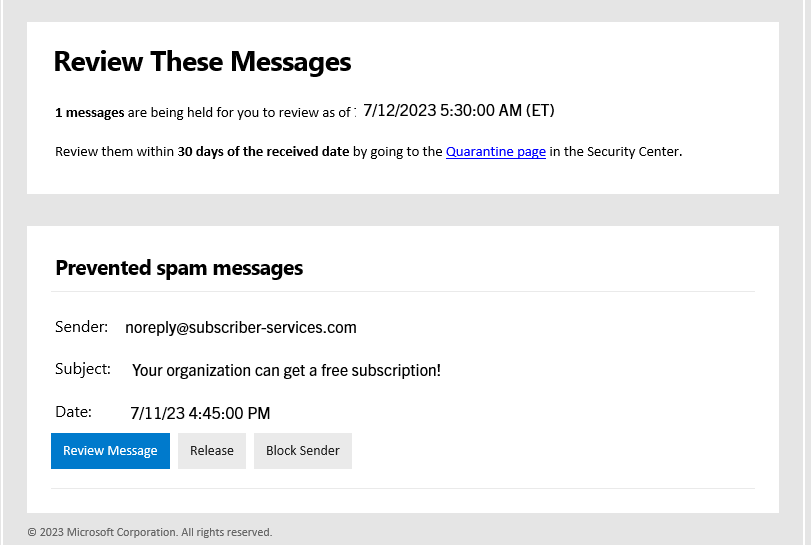
  • If the filter blocks suspected spam, phishing, or malware messages, you may receive a “quarantine” notice from Microsoft, allowing you to review and request it to be released if necessary. Quarantine notices will be sent once a day.  

An example quarantine message from Microsoft may appear in this format: 

  • To view emails flagged as spam, phishing, or malware, you can find instructions from Microsoft. If you were expecting a message and suspect it may have been blocked, you can follow their instructions to manually check. 

In addition to enhancing security, CCIT remains committed to helping you navigate changes. If you have questions, concerns, or need assistance with the spam retrieval changes, contact the CCIT Support Center team at ithelp@clemson.edu or (864) 656-3494.  

PeopleSoft and Banner Outage on June 11, 2023

On Sunday, June 11, 2023, PeopleSoft and Banner/iRoar services will be down from 7 a.m. – midnight EDT for CCIT engineers to conduct mandatory server hardware updates. These updates will enhance operations and safety. Impacted services include: 

  • PeopleSoft – including, but not limited to, Employee Self-Service, paystubs, W-2s and job applications
  • Banner/iRoar – including all iROAR applications such as Student Self-Service, Faculty/Advisor Self-Service, and course registration

Normal access to both PeopleSoft and Banner/iROAR applications should be restored by Monday, June 12, 2023 at 12 a.m.

If you run into issues or need assistance, please contact CCIT by emailing ITHELP@clemson.edu, calling/texting (864)656-3494 or visiting support.clemson.edu. Thank you for your patience. 

Upcoming Changes to Google Workspace

Clemson University is proud to offer industry-leading collaboration and workspace tools for Clemson employees and students, including Google Workspace. Recently, Google announced policy and pricing changes that will impact Clemson’s ability to support some parts of Google Workspace, including storage and email. CCIT has worked with stakeholders and leadership across the University to create a plan that will meet both Clemson’s financial and technological goals while minimizing impact to the Clemson community.

Email

Students

Students are increasingly being targeted with phishing and scam emails. Google Mail lacks the security tools used by Clemson to negate these attacks. Starting in 2024, incoming students will use @clemson.edu email addresses with Microsoft Exchange. Over the coming years, Google Mail (@g.clemson.edu) addresses will be phased out for students.

Faculty and Staff

Eventually, all faculty and staff using @g.clemson.edu email addresses will be migrated to @clemson.edu addresses with Microsoft Exchange. Employees should consider setting up their Exchange email accounts when convenient prior to the migration deadline, to be announced at a later date.

Once these changes are made, faculty, staff and current students will still have access to other Google services, such as Google Drive. At this time, Clemson is only transitioning away from Google Mail for these groups.

Recent Graduates

Per Clemson’s Email Policy introduced in Spring 2023, graduates will have access to their Clemson email for one year following graduation. This new policy applies to students graduating in May 2023 and beyond.

Alumni and Former Employees

Beginning in early 2024, Alumni and former Clemson employees will no longer have access to Clemson email. Alumni and former employees who use their Clemson email should update their contacts with a different, non-Clemson email address (Gmail, Hotmail, etc.) prior to 2024. The impact of this change is expected to be minimal, as only a small percentage of these users actively use their Clemson email addresses. Clemson will contact these active users individually to ensure they are aware of the coming changes and ensure a smooth transition. Note that this change does not affect Emeritus Faculty.

Storage

Due to the elimination of free, unlimited storage by Google on July 1, 2024, Clemson will have limited storage available for use University-wide. As it currently stands, Clemson users’ storage total far exceeds our Google storage allotment. To meet this allocation limit, Clemson must implement a per-person storage quota for active students, faculty and staff, to be announced at a later date.

Alumni and Former Employees

A significant portion of the University’s current storage is used by alumni and former employees. Starting in early 2024, Clemson alumni and former employees will no longer have access to Google Workspace, including Google Drive. This should give users sufficient time to download all of their files and store them in a new location, such as a portable hard drive or a cloud-based storage provider (e.g. Box.com). Google Takeout service allows users to download their files from Google Workspace. Note that this change does not affect Emeritus Faculty.

Frequently Asked Questions

Why are these changes happening?
Changes by Google to their license and storage model eliminated free, unlimited storage for all educational accounts. Due to these added costs, we must reduce our reliance on Google for services like email and storage since we already have other solutions in place.

Who is impacted by these changes?
The good news is that most active students, faculty and staff will have little to no impact from this project, and users should still be able to complete their day-to-day tasks. The largest change affects Clemson alumni. Starting in early 2024, alumni will no longer have access to Google Workspace, including Mail and Drive.

What if I need to store a large amount of data for my research?
If researchers believe they need more storage than the allotted amount on Google Workspace for their data (to be determined at a future date), they should request a Palmetto HPC account. All Clemson researchers can use and receive training on the Palmetto Cluster for free.
Temporary Restrictions to iROAR Access – Nov. 30, 2022

iROAR/Banner is currently restricted to those accessing via an on-campus connection, through CUapps or through the Clemson Virtual Private Network (VPN). Students needing to register for classes from off-campus will need to connect to CUapps or through the VPN before accessing iROAR. CUapps is recommended for students. For more, visit our iROAR Access page.