Following a recent update to Kronos, University users will now need to use a new link to log in. The new Kronos URL, effective September 8, 2025, is: https://kronos.app.clemson.edu/
If you currently have the old Kronos link saved in your bookmarks, please update it to the new URL.
For Kronos mobile app users:
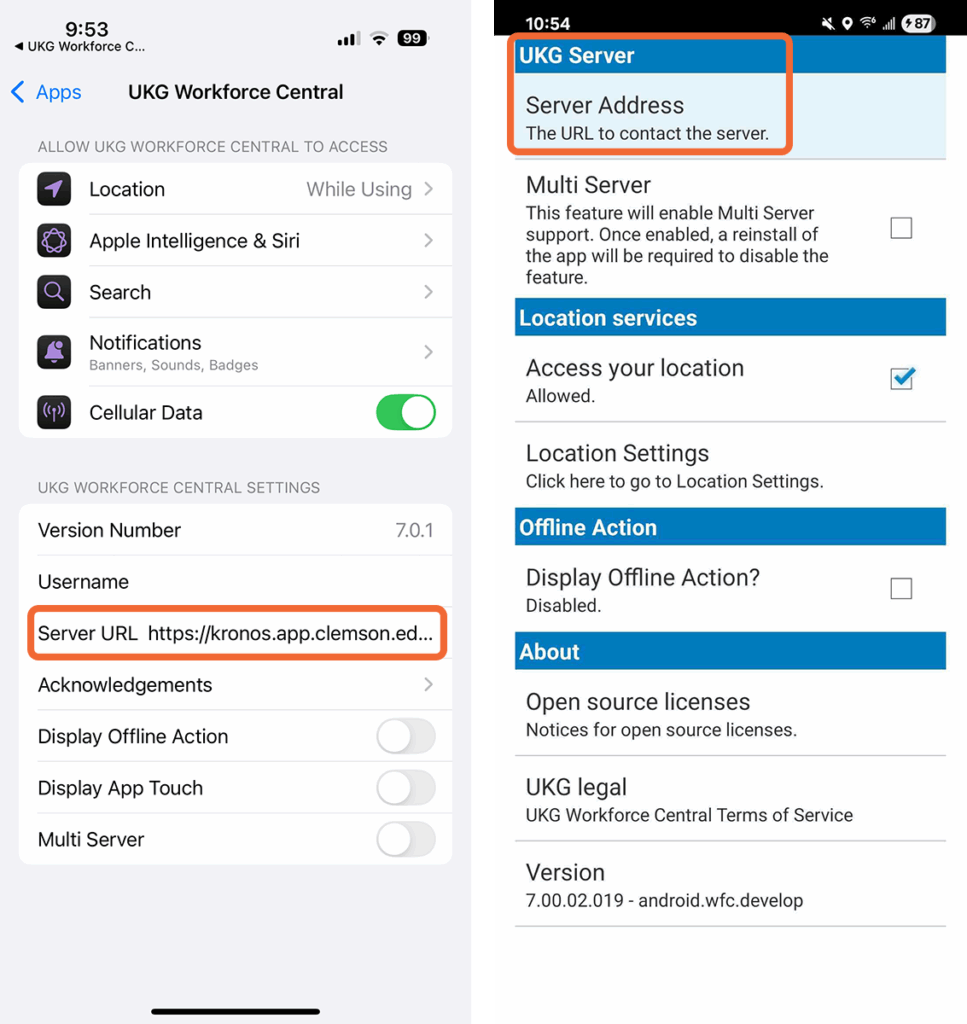
If you use the Kronos mobile app (also known as UKG Workforce Central), follow the instructions below to update the server URL within the app settings to the new URL. Open the UKG Workforce Central settings, remove the old server URL and replace it with: https://kronos.app.clemson.edu/wfc
From an iPhone (pictured left):
- Open Settings
- Select Apps
- Select UKG Workforce Central
- Paste
https://kronos.app.clemson.edu/wfcin the Server URL field.
From an Android phone (pictured right):
- Open the UKG Workforce Central app
- Tap on the three vertical dots on the bottom menu bar
- Select Settings
- Select Server Address
- Paste
https://kronos.app.clemson.edu/wfcin the Server Address field - Select ‘OK’
Please note that the app may take a few minutes to load after changing the Server URL. Follow these instructions if you need to set up the Kronos app on your device for the first time.
If you are still having issues accessing Kronos via web or mobile, contact the CCIT Support Center or your area’s IT consultant.
