On Monday, March 18, 2024, CCIT engineers will conduct systems testing that will temporarily impact the functionality of systems. Systems impacted by this test will include:
PeopleSoft
Office of Human Resource’s Policies and Procedures webpage
Time Capture
OnBase-Performance
Tiger Talent
Tiger Time Trackers (Please note: Time Trackers will still work during the outage, but punches will be delayed when adding to Kronos)
The outage is scheduled to occur between 12 p.m. and 1 p.m., only lasting for an hour. Please ensure you have saved any work you may be doing before the planned outage. To see real-time updates about this test, visit CCIT’s Status Hub. We apologize for any inconvenience this may cause and appreciate your patience. If you have further questions or concerns, please contact the CCIT Support Center at ithelp@clemson.edu or at (864) 656-3494.
CCIT’s Research Computing and Data (RCD) will host an interactive Town Hall on Friday, March 15, to continue sharing information and offering updates. During this meeting, members of the RCD team will present the following updates and topics for discussion:
Palmetto Maintenance (tentatively May 6-May 10)
Introducing new RCD Staff
All new nodes and owner nodes moving to SLURM in May
ZFS File system will be retired this summer
Introducing the GLOBUS enterprise license for moving large data sets easily
… and more!
Attendance of this virtual town hall is encouraged for members of the campus community who may work directly with these topics or are curious to learn more about updates in CCIT’s RCD group.
Spring break is right around the corner and itineraries may be well underway. Now more than ever, staying safe on trips extends far beyond applying enough sunscreen, staying hydrated, and moving in groups. In fact, technology can play a key role in keeping you safe, especially when so many of our plans involve our smartphones and different applications.
Here are some quick reminders to ensure you can stay tech safe this Spring Break too:
Use Clemson VPN when connecting to “unsecured” wifi networks. This will keep others from potentially accessing what you are browsing, especially with transactions.
Seek out eduroam networks if traveling near another campus community. These are more secure and you will automatically connect to them if you use those devices on Clemson’s eduroam. There are over 33,000 eduroam connections worldwide!
Do not plug your cellphone charger directly into a USB port at the airport or on transportation. Always use a charger block and an outlet.
Passwords protect all of your devices. Do not use passwords that are easily breakable either. 1234 is a good way to have your information 123-gone. While sharing is caring in most scenarios, keep those passwords to yourself.
Disable Bluetooth when not in use. It may be tempting to keep it on all the time but this is one way to prevent unwanted device pairings/connections.
Do not fall for phishing scams or too-good-to-be-true deals for rentals of any kind. Ensure you are using a secure, legitimate service website. Cybercriminals know that Spring Break happens in March, too.
Avoid sharing your exact location on social media. Be mindful that people may be able to locate you and while it may be tempting to share exactly where you are and the cool stuff you are doing on your trip, consider how it impacts your safety and the safety of others around you.
We wish all of our Tigers a happy, healthy, and safe Spring Break. Take care of yourselves and know that we are here to support you if needed. To see the adjusted Spring Break CCIT Support Center hours, visit this page.
Pauline Sawadogo, IT Technician II in Clemson’s Network Operation Center (NOC)
Pauline Sawadogo made Supercomputing Conference (SC) history in 2023. Sawadogo, an IT Technician II in the Network Operations Center (NOC), was the first woman from South Carolina and Clemson University to participate in the Women in IT Networking at Supercomputing Conference (WINS) Program. Flash forward twelve months and Sawadogo is grateful she had the chance to collaborate and network with so many women in highly technical spaces spanning industry and academia.
“This gathering brought together researchers, experts from diverse fields, and professionals,” Sawadogo explained. “Being part of it provided me with the opportunity to collaborate with them, learn, and establish connections for lifelong collaboration.”
The WINS program started in 2015 to help bridge gender gaps in Information Technology spaces, with specific focus on network engineering and high-performance computing. The program also funds travel opportunities and enables women to complete S.C. projects together, gain hands-on skills and mentorship. In 2023, seven women, including Sawadogo, were selected as awardees to participate. The annual international conference was held in Denver, Colorado November 17-19, 2023, and Sawadogo attended as a member of the SCinet group of volunteers.
In her role at Clemson, Pauline describes her daily tasks as diverse; including “monitoring network devices, troubleshooting wired and wireless network connection issues, creating DNS records, and firewall rules and Network security.” Through her participation in WINS, she said she was able to further build on these skills.
“The event highlighted the latest advancements in hardware and software technologies. We gained hands-on experience with cutting-edge technology, addressing issues and optimizing performance,” Sawadogo explained. “In the edge and wireless team, we implemented zero-touch provisioning to swiftly configure numerous switches, significantly speeding up our daily tasks and minimizing errors associated with manual configurations.”
Sawadogo’s participation in the WINS program noticeably coincides with gains in her performance at Clemson, as Steve Fullerton, director of the NOC, noted.
“Since Pauline has worked with the WINS team(s) she has exhibited more confidence in her work abilities,” Fullerton said. “She is willing to explore the network further in depth to find issues and solve them. Pauline has also shown a desire to take on more work to continue her learning.”
While her time as a WINS awardee has come to an end, Sawadogo said she will fondly remember the experience and impact on her, and so many other women’s lives.
“Daily collaboration with my fantastic team members, and particularly enjoying exchanges with fellow WINS women, adds to the richness of this experience,” Sawadogo said. “Working alongside inspiring women has reinforced the understanding that women excelling in this field is not a myth. The existence of the WINS program is crucial, and if it didn’t exist, it would need to be created.”
2023 WINS Photo. Image used with permission from WINS.
Steve Fullerton is proud of the recognition Pauline has brought herself, CCIT, and Clemson through her participation in the WINS program.
“I believe the WINS program is fantastic. Pauline has made contact with people who can coach or mentor her in her career. I am sure, because Pauline was a part of the WINS program last year, and possibly in the future, CCIT will benefit from the knowledge gained. It brings great recognition to Clemson and CCIT.”
For Sawadogo, participation in this program has left her with immense gratitude.
“I am grateful to my management team for placing their trust in me to represent Clemson at this global event, and I appreciate the WINS program for providing early-career women with the chance to embark on such an exciting and valuable learning journey.”
Clemson University employees, staff, and students who use Microsoft Outlook for email have likely noticed that some of their emails get held in quarantine. The quarantine function is part of the University’s security toolset providing proactive, immediate security for the more than 2,600 phishing and scam attempts the University receives by email each month.
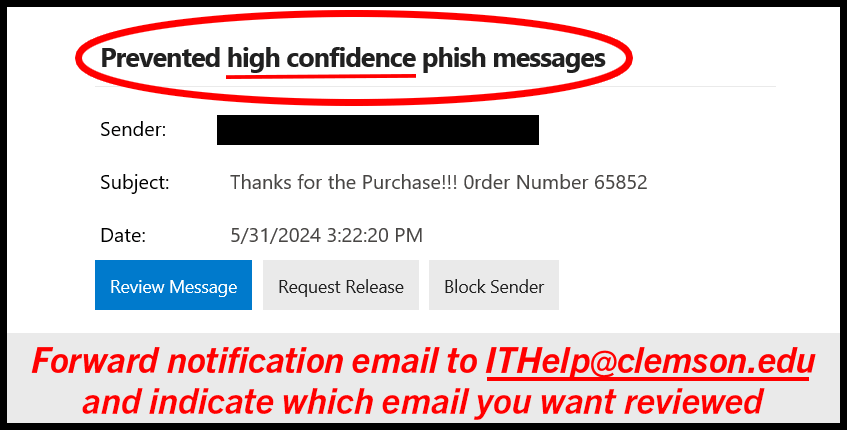
Beginning on Monday, February 26, 2024, faculty, staff, and students who receive email notifications about a “high confidence” phishing email that has been quarantined will be required to take an extra step if they would like to release that email back into their inboxes. This change involves clicking the “Request Release” button in the notification email, followed by emailing ithelp@clemson.edu to start a service ticket for the release. This change does not apply to regular quarantine emails, only those labeled as “high confidence.” The extra step further ensures the CCIT Security Team can inspect and verify if an email is malicious and should not be released. Failure to submit a service ticket for a release request will result in no email release, so this step is important. Again, those with regular quarantine emails who would like to release emails back to their accounts should continue to use the regular Release process.
Helpful screenshots of this change and process are outlined below:
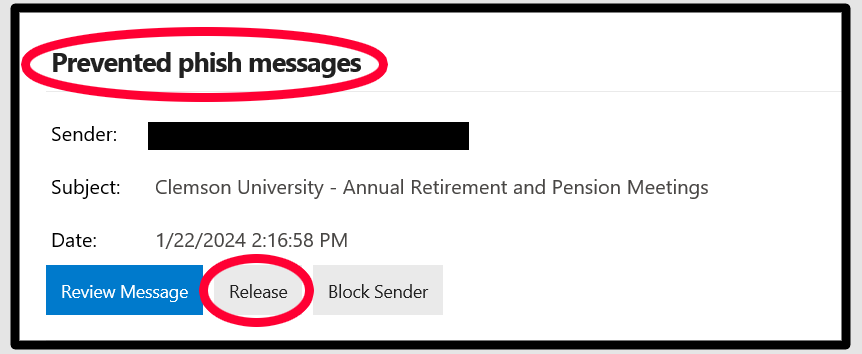
If you receive a regular Prevented type quarantine email similar to the one below, you can still click on the “Release” button as normal. No additional steps are required.
If you receive a High Confidence type quarantine email like the one below and would like the email to be released to your inbox, forward the quarantine notification email to ithelp@clemson.edu to request its review and possible release of that message. Please include the subject line of the email you wish to release in your ITHelp email request.
If you have any questions about this process, please contact the CCIT Support Center at ithelp@clemson.edu or (864) 656-3494. Thank you for helping keep Clemson even more secure!
On Monday, February 19, 2024, at 9 a.m, an added layer of password protection will be implemented to the Clemson Box storage service to help heighten the security of Clemson University documentation. Clemson users can continue using Box as usual without impact; however, they should be aware that this change will affect external users who have been given permission to collaborate within our Box environment. If Box detects that the external party is not using a strong enough password to meet the new requirements, they will be required to choose a stronger one before they can access our Clemson Box Storage service. As a reminder, strong passwords use at least eight characters with a combination of numbers, uppercase letters, and/or special characters. Again, internal Clemson Box account users will not be impacted by this change.
If you have any further questions, please contact the Support Center at ithelp@clemson.edu or (864) 656-3494.
Conceptual technology illustration of artificial intelligence
Clemson University students, researchers, employees and community members may be using the generative artificial intelligence (AI) tools readily available today. ChatGPT, and other AI resources, can offer exciting new opportunities for efficiency in data processing, idea generation for projects, or even programming. As we continue looking at privacy and information security when using AI tools, the Office of Information Security is urging the Clemson community to visit the University’s AI Guidelines page and to remember to use best practices. Now more than ever, we must stay vigilant with the security of our information.
Here are some helpful reminders:
AI Risks
Because data entered into AI is retained and used to train models, it can be the equivalent of disclosing that data to the public which could be considered a breach under FERPA, HIPAA, PCI, GLBA or other federal or state statutes.
Generative AI tools may produce erroneous responses that seem credible, sometimes referred to as “hallucinations.”
Generative AI systems could be trained on copyrighted, proprietary, or sensitive data, without the owner’s or subject’s knowledge or consent.
AI Best Practices
Enter only public data into an AI system. Opt out of sharing data for AI learning whenever possible.
Verify any results through authoritative sources.
Consider legal, regulatory, and ethical obligations before using AI.
Be transparent in disclosing and citing the use of AI tools.
The AI Guidelines page also features a list of specific policies, guidelines and directions related to technology use, sensitive information, and resources where to go for help. This page will continue to be updated as more policies and guidelines are created, so we encourage you to visit it often.
CCIT is nearing completion of the second phase of upgrading the architecture for the web-accessible sites and people servers, which began in Fall 2023. If you are an administrator for one of these sites, you should have already received an email from CCIT regarding this upgrade. Administrators should review your website using the instructions found in the HDKB article linked below and make any necessary changes before go-live on February 29, 2024.
For this final phase, all admins must copy the content of their site(s) to the development environment. Part of this phase includes updating to a newer version of PHP (version 5.4 to 8.2). This large jump in PHP versions is likely to have an impact on any applications on your website built with PHP. We need all administrators to verify that their websites are not affected. Specific versions and details can be found in the HDKB article linked above.
Review your website(s) using the instructions found in the HDKB article linked above and make any necessary changes prior to go-live on February 29, 2024. Once your site is complete, submit a ticket to ithelp@clemson.edu to make the development site.
Please email ithelp@clemson.edu if you have questions, need assistance, or would like for CCIT to decommission a website.
On Friday, March 1, 2024, Amazon Web Services (AWS) is coming to Clemson University’s main campus. Tommy Johnston, an AWS solutions architect for South Carolina and Clemson University alumnus, will lead a free workshop on serverless computing the day before the CU Hackathon. This “Wild Rydes” workshop features hands-on experience with building serverless applications on AWS, including tools like AWS Amplify, AWS Lambda, Amazon API Gateway, and Amazon DynamoDB.
The event is open to faculty, students, and staff and all skill levels are welcome. If you are interested in attending this event, please register here. The exact time and location will be announced soon.
From January 21-27, 2024, Data Privacy Week is celebrated as a reminder to ensure you practice due diligence about your online footprint. This celebration, in addition to Cybersecurity Awareness Month in October, invites us to reflect and remember how we can safeguard ourselves and our institutions against threats or compromises with data.
Here is a short list of reminders for this week, and each day:
Create unique, long passwords! Strong passwords are at least 12 characters long and include letters, numbers and symbols. And, yes, you should have a unique password for each online account. Sounds hard to remember? That takes us to our next tip…
Use a password manager! Ditch the notebook and the Notes app. Instead, the simplest, most secure way to manage unique passwords is through a password manager application. Many are free. Often, browsers and device operating systems already include password managers.
Use Duo 2FA! Two-factor authentication (2FA, for short) asks individuals for a secondary confirmation of their identity at log in using a physical device in their possession (via app or text message). Passwords are essential for security and privacy, but they are often not enough. 2FA acts as an added layer of security to prevent anyone else from accessing your account.
Think before you click! What’s the most common way for cybercriminals to get your sensitive information? It’s when you click on something you shouldn’t have. Malicious links in email, texts, posts, and social media messages are a direct way for hackers to get your sensitive information.
Use a VPN! Public wireless networks and hotspots are unsecured, which means that anyone could potentially see what you are doing on your laptop or smartphone while you are connected to them. Use Clemson’s virtual private network (VPN) to establish a secure connection.
Remember, if you want to be aware of what types of scams are happening on campus or are hoping for reminders about best practices, you are encouraged to frequently visit CCIT’s Cybersecurity Alerts page.