Members of the Clemson University campus community should be aware of a forced Windows update occurring on August 16, 2024. Once prompted for update, users will have 24 hours to reboot their Windows 10 and up machines for the required safety update. Please adjust your work accordingly and continue to update your Clemson devices as required.
CCIT News and Notices
Important Updates to SmartSheet
Clemson University’s Procurement and Business Services informed Smartsheet on August 12, 2024, the University will no longer permit license purchases or renewals of Smartsheet due to Smartsheet’s inability to support accessibility as defined by the Americans with Disabilities Act (ADA).
Clemson University strives to create an accessible environment for all its community. Therefore, it is essential any tools used to conduct business conform with ADA accessibility standards.
Sunsetting Smartsheet at Clemson
Sunsetting Smartsheet places Clemson on a path towards federal compliance with Title II of the ADA.
Steps to Compliance:
- Beginning August 12, P-Cards may no longer be used to purchase licenses or renewals for Smartsheet products.
- Faculty and staff currently using the product must begin a sunsetting plan and navigate to other options.
- If you need assistance with this process, faculty and staff are encouraged to reach out to their area’s IT Consultant. They can connect you with alternatives or help you in this transition.
First-Year Laptop Set-Up Workshops to Help Students Prepare for a New Semester
Teams of CCIT employees are excited to help new first-year students ensure their laptops are ready for a new semester and academic year. On Monday, August 19 and Tuesday, August 20, students can bring their laptops to workshop sessions for their colleges and types of laptops. These sessions will inform students about CCIT’s software offerings and cover basic set-up topics such as connecting to eduroam for wifi, accessing Adobe products, ensuring their email accounts are working, and getting answers to any other questions. Students must register in advance via this link to secure their spot and arrive on time at the start of each session.
The schedules are identical each day and are planned as follows:
Monday, August 19 and Tuesday, August 20
Business + Education: 9:00 a.m. to 10:30 a.m.
- Apple computers in Cooper 200b (second floor)
- Windows computers in Lee Hall Room 111
CECAS: 11:00 a.m. to 12:30 p.m.
- Apple computers in Cooper 200b (second floor)
- Windows computers in Lee Hall Room 111
Science + BSHS: 1:00 p.m. to 2:30 p.m.
- Apple computers in Cooper 200b (second floor)
- Windows computers in Lee Hall Room 111
CAH + CAC + Forestry: 3:00 p.m. to 4:30 p.m.
- Apple computers in Cooper 200b (second floor)
- Windows computers in Lee Hall Room 111
“Do I Keep My Email?” and Other Tech Questions from Graduating Tigers

Graduation is an exciting time for every Tiger, but it unfortunately does mean a change to some of the software and services you’ve grown accustomed to during your time at Clemson. Luckily, with a few minutes of review, you can prepare your technology and data for graduation.
Frequently Asked Questions
Do I keep my Clemson Google account?
Graduates will have access to their Clemson Google account for one year following graduation. Please note that forwarding of your @clemson.edu email address will cease soon after your username is deactivated. We suggest updating your contacts or accounts to use a different email address so you don’t lose anything when your account is closed.
We recommend you move your Google Drive files to another cloud storage service or personal Google Drive account in preparation for the closure of your Clemson Google account after one year. You can use Google Takeout (takeout.google.com) to export your Google account data if you wish to store it elsewhere, or you can use the transfer service (takeout.google.com/transfer) if you plan to move it to another Google account.
What about the files in my other cloud storage accounts?
- Your access to Box and OneDrive will end one year after graduation. We recommend that you download your files from those accounts as soon as possible, so you don’t forget about them.
- Any files you create and manage in CUapps (Citrix) are stored on your U: drive (also called Home Directory). You will have access to your U: drive for one year after graduation, so be sure to download those files before you lose them. The CCIT Knowledge Base contains instructions to access your U: drive for macOS and Windows.
- If you use the Palmetto Cluster or any of Clemson’s research computing storage, we recommend you download your data from there as well. For research computing assistance, contact Research Computing and Data.
What software do I keep?
Once you graduate, you will no longer qualify to reinstall Clemson’s site-licensed software. Access to Adobe Creative Cloud will be disabled upon graduation as well. Make sure to save copies of your Adobe files, projects and assets, or use these instructions from Adobe on how to transfer your assets to a new Adobe profile.
Can I download my submitted Canvas assignments?
Yes. Visit our CCIT Knowledge Base for step-by-step instructions.
Is there anything else I should do?
- Save a copy of your unofficial transcript after final grades are submitted. After your Username is deactivated, you will no longer be able to access your unofficial transcript—we suggest you save a copy sooner rather than later. After your Username is deactivated, you will have to request an official copy for a fee, as directed by the Registrar’s transcripts page.
- Save a copy of your tax records. After your Username is deactivated, you will no longer be able to access iROAR for your billing information. If your account is deactivated and you need to get these records, contact CCIT at (864) 656-3494.
If you have any questions or need assistance, please contact CCIT Support by calling/texting (864) 656-3494, emailing ITHELP@clemson.edu or starting a chat by visiting TigerHub and clicking the orange chat box at the bottom of the page.
OneDrive Users Targeted
The Trellix Advanced Research Center has discovered a sophisticated phishing campaign that specifically targets OneDrive users.
In this campaign, users receive an email that contains a .html (web page type) file. When that file is opened, the user will see something like the image below, which simulates a Microsoft OneDrive page with an error message.
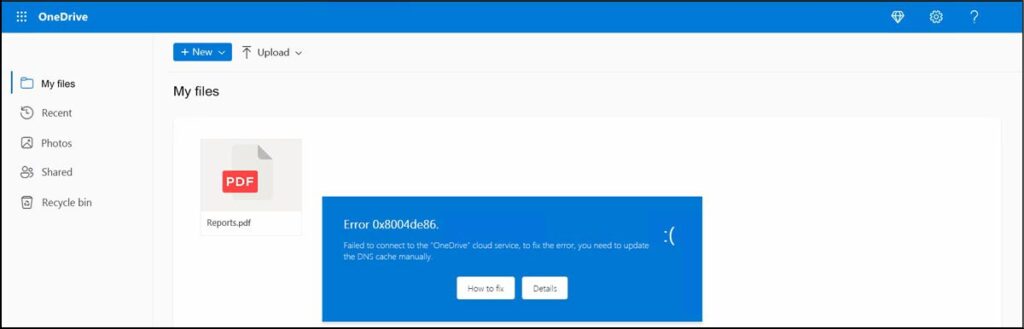
The blue fake error message pop-up will say that there is a DNS issue with the user’s OneDrive. And the error display has two buttons. The “Details” button will actually take users to the real Microsoft web page for troubleshooting a DNS issue. But if a user clicks on the “How To Fix” button, it will launch a JavaScript program embedded within the HTML file. That JavaScript will display additional misleading instructions for the user. If followed, the result will be unknowingly downloading malware onto the user’s computer.
This particular attack uses misleading visual elements and a sense of urgency as its attack vector. For additional information, please see the full article at: https://www.trellix.com/blogs/research/onedrive-pastejacking/
Student Loan Phishing Email
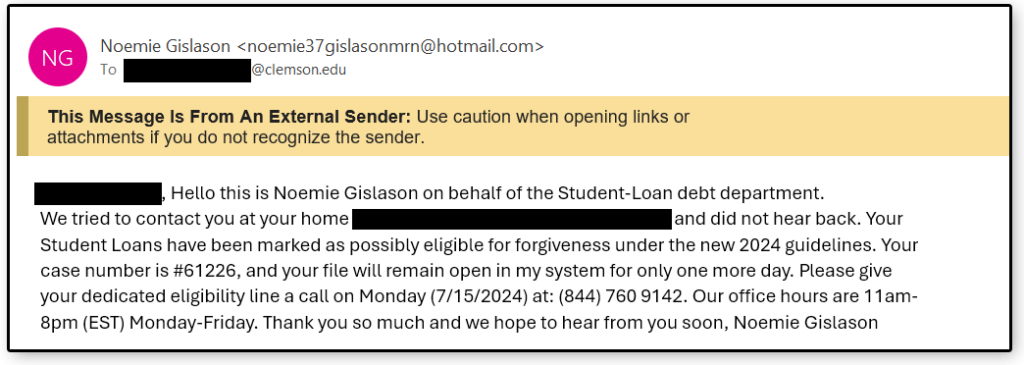
Clemson students are being targeted with a new phishing email that references paying off Student Loans. One unique element of these emails is that they contain the student’s name and their home mailing address. These phishing emails were sent to students via their g.clemson or clemson.edu accounts.
Students are prompted to call a phone number that would most likely result in being asked to verify some more personal information which the cybercriminals could also use as part of their scheme. Typically, their goal is to steal money.
There were several indicators that this was not a legitimate email:
- The sender’s address is a generic Hotmail account.
- It has a “too good to be true” theme.
- There is also a sense of urgency prompting users to respond quickly, which is a common tactic because they are hoping that you won’t be thinking clearly if you are in a hurry.
If students receive an email like the one below, they should report it by clicking on the “Report Phishing” button in Outlook or forwarding it to phishing@clemson.edu.
Scam Alert: Clemson Students Targeted in Job/Internship/RA Scam Campaigns
The Office of Information Security at Clemson University is urging students to exercise extreme caution when opening, receiving or responding to emails related to opportunities like jobs, internships or Research Assistantships (RA). At this time, students are being targeted with emails appearing to be legitimate, requesting responses with personal information like email addresses, full title, Clemson department affiliation and year of study. These emails may appear to come from people within the “Office of Academic Affairs” or “Office of Job Placement and Student Service.” The sender of these emails does not have an @clemson.edu email address and requests immediate action for response to a person with a non-Clemson email address. These items indicate that the email is not legitimate and should be reported immediately by forwarding the email to phishing@clemson.edu.
If someone is emailing you about job opportunities and requesting a response, always practice extreme caution and do not immediately assume the source is legitimate. An example of the email students are receiving is below:

Outage of Multiple Clemson Applications, June 26, 2024
CCIT engineers are working to restore services across Clemson University applications. There is no ETA on these applications returning, however, the Status Hub will continue to be updated as changes occur. We apologize for any inconvenience.
Stay Alert Against Vishing Calls

Clemson University is seeing an increase in voice phishing, or vishing calls. Vishing is a social engineering tactic performed through phone calls where the caller uses deception and manipulation to gain access to a system or to personal information. The goal of a vishing phone call is to gain access to someone’s account or service by posing as someone they are not. Once a cybercriminal has access to your account, they can change passwords and lock you out of your own account in addition to transferring data or funds from financial accounts.
One example could be someone calling you saying they are a representative of your bank and are seeing some potentially fraudulent purchases on your credit card. They ask you to verify your information, including mailing address, date of birth, or account number. Once they have this information, they could call your bank after and claim to be you. When the bank asks them for the personal information on the account, the cybercriminal now has the right answers from their call with you.
To reduce the risk of becoming a vishing victim it is recommended to not answer calls from unknown numbers on your personal phone. If you do get a message or call claiming there is an urgent issue, do not trust the validity of the call right away. It is always safer to verify the information yourself by hanging up from the call and then calling the institution or person who supposedly just called you. Do not trust the caller is who they say they are and always verify on your own before giving them personal information.
Visit this page periodically to stay updated on recent cybersecurity alerts. The Office of Information Security provides frequent updates as new threats or attempts are reported.
Social Engineering Calls

Clemson University is seeing an increase in voice phishing, also known as vishing. Vishing is a social engineering tactic done through phone calls where the caller uses deception and manipulation.
The goal of the vishing phone call is to pose as someone they are not and then to gain access to someone’s account or service. Once the cybercriminals have access to your account, they can change passwords to lock you out of your own account as well as transfer data or even funds from your financial institution.
For example, you may get a call from someone saying they are from your bank, and that they are seeing some potentially fraudulent charges on your credit card. Then, they may ask you to verify some of your information, such as your mailing address, birth date, or account number. Once they have some of that key information, they could then call your actual bank and claim to be you. When your real bank asks for some of your personal information to verify that it is really you calling, the cybercriminals can provide that information because you just gave it to them.
Another example would be someone calling a Support Desk asking for help in resetting their password. When the support person asks them to confirm their identity by sending something to the user’s phone, the fake caller could make up some excuse about how they lost their phone, which is why they are calling to reset their password. The Support Desk employee who is trying to be helpful may then let them skip that step. The cybercriminals sometimes will even research personal details on their victims from social media to help them answer other key information if asked.
To help reduce the risk of becoming a victim of vishing, it is recommended that you don’t answer calls from unknown numbers on your personal phone. If you do get a message or call claiming that there is an urgent issue, like an alert from your financial institution, a billing issue from a service that you use, a family medical emergency, or even someone asking you to do something for them, don’t necessarily trust the validity of that call.
It is always better to verify the information yourself. Hang up from that call and then call the institution, service, or person who supposedly just called you to verify whether the issue is legitimate. Don’t trust that the caller is who they say they are. And verify first, before giving any information or taking any action.
