CCIT News and Notices

Changes to Clemson Email Quarantine

Clemson University employees, staff, and students who use Microsoft Outlook for email have likely noticed that some of their emails get held in quarantine. The quarantine function is part of the University’s security toolset providing proactive, immediate security for the more than 2,600 phishing and scam attempts the University receives by email each month.

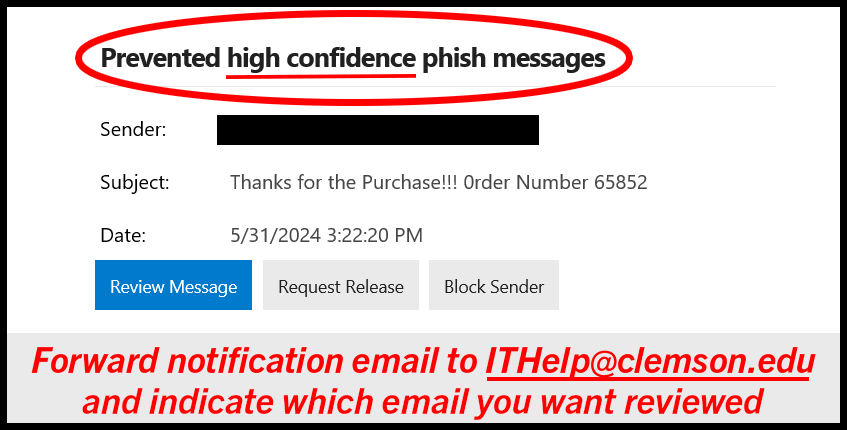
Beginning on Monday, February 26, 2024, faculty, staff, and students who receive email notifications about a “high confidence” phishing email that has been quarantined will be required to take an extra step if they would like to release that email back into their inboxes. This change involves clicking the “Request Release” button in the notification email, followed by emailing ithelp@clemson.edu to start a service ticket for the release. This change does not apply to regular quarantine emails, only those labeled as “high confidence.” The extra step further ensures the CCIT Security Team can inspect and verify if an email is malicious and should not be released. Failure to submit a service ticket for a release request will result in no email release, so this step is important. Again, those with regular quarantine emails who would like to release emails back to their accounts should continue to use the regular Release process. 

Helpful screenshots of this change and process are outlined below: 

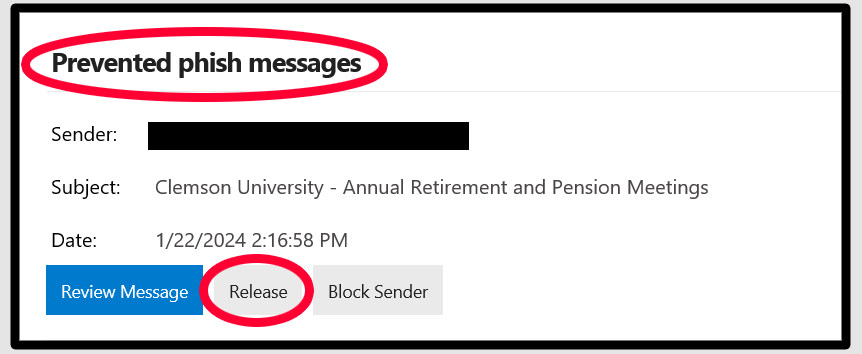
  • If you receive a regular Prevented type quarantine email similar to the one below, you can still click on the “Release” button as normal. No additional steps are required. 
  • If you receive a High Confidence type quarantine email like the one below and would like the email to be released to your inbox, forward the quarantine notification email to ithelp@clemson.edu to request its review and possible release of that message. Please include the subject line of the email you wish to release in your ITHelp email request.
If you have any questions about this process, please contact the CCIT Support Center at ithelp@clemson.edu or (864) 656-3494. Thank you for helping keep Clemson even more secure! 
Fake Student Job Email

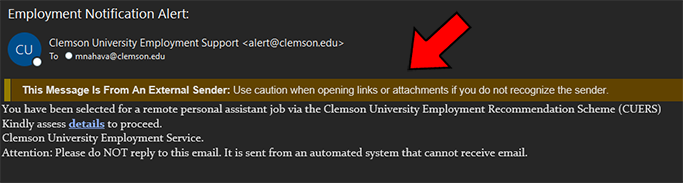
Clemson students are again being targeted with a new phishing email campaign about a fake job offer. In these emails, the cybercriminals are spoofing various Clemson email sender addresses, such as “alert@clemson.edu” or “employment_services@my.clemson.edu” making it appear that it is coming from a real Clemson.edu account.

One of the clues that these are not legitimate Clemson emails is that Outlook users will see that these emails have been flagged with the External Sender banner at the top of the email, which indicates that this email did not actually come from an internal Clemson email account.

Also, be aware that Clemson does not typically reach out to students with job offers in this manner.

These phishing emails include a link where users are asked to enter their Clemson login and password information which will then be stolen by the cybercriminals and used in their attack.

If you entered your Clemson credentials into their fake web page, it is recommended that you immediately reset your password and notify the CCIT Support Center at (864) 656-3494 or ITHelp@clemson.edu.

Screenshot of an email with the Subject 'Clemson University Employment Support' from a non-Clemson account that has a warning for being from an external sender. The email informs the recipient they have been selected for a remote personal assistant position from a fake Clemson service.

Important Change for Box Storage External Collaborators

On Monday, February 19, 2024, at 9 a.m, an added layer of password protection will be implemented to the Clemson Box storage service to help heighten the security of Clemson University documentation. Clemson users can continue using Box as usual without impact; however, they should be aware that this change will affect external users who have been given permission to collaborate within our Box environment. If Box detects that the external party is not using a strong enough password to meet the new requirements, they will be required to choose a stronger one before they can access our Clemson Box Storage service. As a reminder, strong passwords use at least eight characters with a combination of numbers, uppercase letters, and/or special characters. Again, internal Clemson Box account users will not be impacted by this change. 

If you have any further questions, please contact the Support Center at ithelp@clemson.edu or (864) 656-3494.

Security Shares Helpful Guidelines and Resources for AI Use

Conceptual technology illustration of artificial intelligence

Clemson University students, researchers, employees and community members may be using the generative artificial intelligence (AI) tools readily available today. ChatGPT, and other AI resources, can offer exciting new opportunities for efficiency in data processing, idea generation for projects, or even programming. As we continue looking at privacy and information security when using AI tools, the Office of Information Security is urging the Clemson community to visit the University’s AI Guidelines page and to remember to use best practices. Now more than ever, we must stay vigilant with the security of our information.

Here are some helpful reminders: 

AI Risks

  • Because data entered into AI is retained and used to train models, it can be the equivalent of disclosing that data to the public which could be considered a breach under FERPA, HIPAA, PCI, GLBA or other federal or state statutes. 
  • Generative AI tools may produce erroneous responses that seem credible, sometimes referred to as “hallucinations.”
  • Generative AI systems could be trained on copyrighted, proprietary, or sensitive data, without the owner’s or subject’s knowledge or consent.

AI Best Practices

  • Enter only public data into an AI system. Opt out of sharing data for AI learning whenever possible.
  • Verify any results through authoritative sources.
  • Consider legal, regulatory, and ethical obligations before using AI.
  • Be transparent in disclosing and citing the use of AI tools.

The AI Guidelines page also features a list of specific policies, guidelines and directions related to technology use, sensitive information, and resources where to go for help. This page will continue to be updated as more policies and guidelines are created, so we encourage you to visit it often. 

Deadline Approaching for Sites.Clemson.Edu Departmental Web Spaces

CCIT is nearing completion of the second phase of upgrading the architecture for the web-accessible sites and people servers, which began in Fall 2023. If you are an administrator for one of these sites, you should have already received an email from CCIT regarding this upgrade. Administrators should review your website using the instructions found in the HDKB article linked below and make any necessary changes before go-live on February 29, 2024.

Instructions: https://ccit.clemson.edu/support/kb/?id=2766

For this final phase, all admins must copy the content of their site(s) to the development environment. Part of this phase includes updating to a newer version of PHP (version 5.4 to 8.2). This large jump in PHP versions is likely to have an impact on any applications on your website built with PHP. We need all administrators to verify that their websites are not affected. Specific versions and details can be found in the HDKB article linked above.

Review your website(s) using the instructions found in the HDKB article linked above and make any necessary changes prior to go-live on February 29, 2024. Once your site is complete, submit a ticket to ithelp@clemson.edu to make the development site.

Please email ithelp@clemson.edu if you have questions, need assistance, or would like for CCIT to decommission a website.

Register for a Free AWS “Wild Rydes” Workshop

Image from AWS Wild Rydes Workshops

On Friday, March 1, 2024, Amazon Web Services (AWS) is coming to Clemson University’s main campus. Tommy Johnston, an AWS solutions architect for South Carolina and Clemson University alumnus, will lead a free workshop on serverless computing the day before the CU Hackathon. This “Wild Rydes” workshop features hands-on experience with building serverless applications on AWS, including tools like AWS Amplify, AWS Lambda, Amazon API Gateway, and Amazon DynamoDB. 

The event is open to faculty, students, and staff and all skill levels are welcome. If you are interested in attending this event, please register here. The exact time and location will be announced soon.

Celebrate Data Privacy Week by Remembering Best Practices

From January 21-27, 2024, Data Privacy Week is celebrated as a reminder to ensure you practice due diligence about your online footprint. This celebration, in addition to Cybersecurity Awareness Month in October, invites us to reflect and remember how we can safeguard ourselves and our institutions against threats or compromises with data.

Here is a short list of reminders for this week, and each day:

  1. Create unique, long passwords! Strong passwords are at least 12 characters long and include letters, numbers and symbols. And, yes, you should have a unique password for each online account. Sounds hard to remember? That takes us to our next tip…
  2. Use a password manager! Ditch the notebook and the Notes app. Instead, the simplest, most secure way to manage unique passwords is through a password manager application. Many are free. Often, browsers and device operating systems already include password managers.
  3. Use Duo 2FA! Two-factor authentication (2FA, for short) asks individuals for a secondary confirmation of their identity at log in using a physical device in their possession (via app or text message). Passwords are essential for security and privacy, but they are often not enough. 2FA acts as an added layer of security to prevent anyone else from accessing your account.
  4. Think before you click! What’s the most common way for cybercriminals to get your sensitive information? It’s when you click on something you shouldn’t have. Malicious links in email, texts, posts, and social media messages are a direct way for hackers to get your sensitive information.
  5. Use a VPN! Public wireless networks and hotspots are unsecured, which means that anyone could potentially see what you are doing on your laptop or smartphone while you are connected to them. Use Clemson’s virtual private network (VPN) to establish a secure connection.

Remember, if you want to be aware of what types of scams are happening on campus or are hoping for reminders about best practices, you are encouraged to frequently visit CCIT’s Cybersecurity Alerts page.

Retirement Planning Email

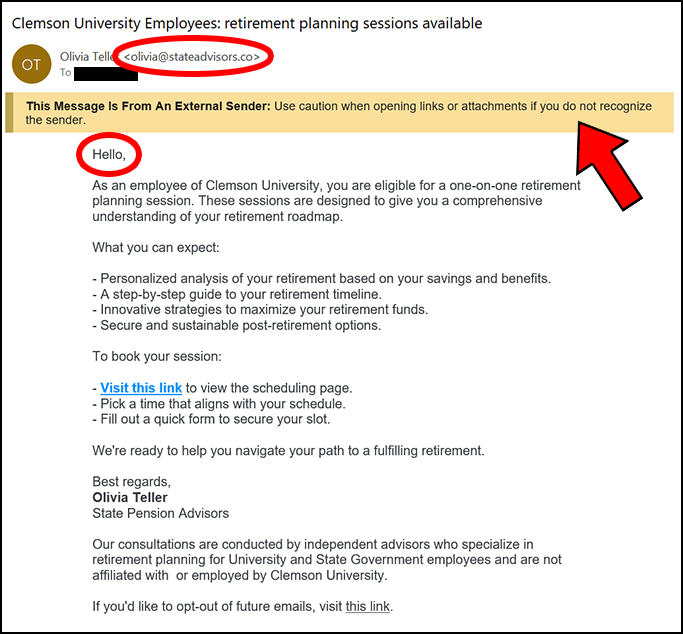
Many Clemson University employees recently received an email like the one below. It encourages the recipient to follow a link and sign up for a session to help plan their retirement.

Clemson Human Resources has verified that this is not a legitimate email from the SC Benefits program, which handles our state retirements. There is a disclaimer in the email that says their representatives are independent and not state or university employees.

There are also several indicators in this email showing that it is not an official Clemson correspondence:

  • The sender’s email address is not “.edu” or “sc.gov”
  • The greeting is generic and doesn’t use your name.
  • The External Sender banner is displayed, meaning that it is coming from an outside source.

Be aware that if you respond to this email, you will be dealing with a non-Clemson entity, and you should exercise extreme caution about sharing any personal or financial information.

Retirement Planning Email

Many Clemson employees recently received an email like the one below. It encourages the recipient to follow a link and sign up for a session to help plan their retirement.

Clemson HR has verified that this is not a legitimate email from the SC Benefits program, which handles our state retirements. There is also a disclaimer in the email that says their representatives are independent and not state or university employees.

And there are several indicators in this email showing that it is not an official Clemson correspondence.

  • The sender’s email address is not “clemson.edu” or “sc.gov”
  • The greeting is generic and doesn’t use your name
  • The External Sender banner is displayed, meaning that it is coming from an outside source.

Be aware that if you respond to this email, you will be dealing with a non-Clemson entity, and you should exercise extreme caution about sharing any personal or financial information.

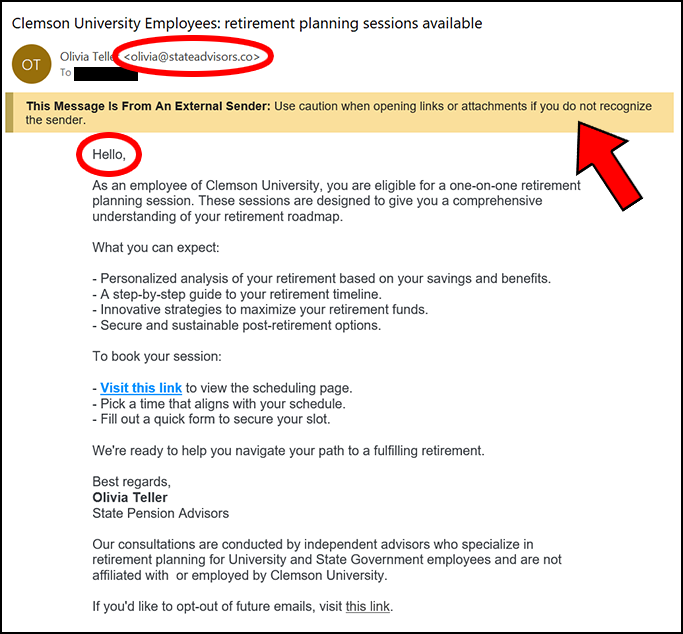
Screenshot of an email with the subject 'Clemson University Employees: retirement planning sessions available' and a warning message that it is from an external sender and not a Clemson user. The email contains information about scheduling a retirement planning session but it is not from a legitimate South Carolina resource.

Stay Alert Against Messaging Apps Scams

Messaging apps, like WhatsApp, are being used by cybercriminals to target potential victims in cryptocurrency scams. Unlike other scams, this one begins as a friendly relationship, where the cybercriminal will attempt to develop a sort of friendship for a few weeks. It can even be posing as an accidental wrong number contacting you. According to a recent article on CNN, after weeks of back and forth friendly updates, the cybercriminals will send links to download an app that appears as legitimate cryptocurrency account software. Victims who have fallen for these scams have lost enormous amounts of money. 

The Clemson University campus community is encouraged to practice due diligence and not engage with messages from unknown or unexpected contacts. Additionally, users should avoid clicking on links in messages from unknown sources. To learn more about what kinds of scams are happening, visit CCIT’s Cybersecurity Alerts page.