CCIT News and Notices

Quick Tech Tips to Keep You Safe on Spring Break

Spring Break is right around the corner and itineraries may be well underway. Now more than ever, staying safe on trips extends far beyond applying enough sunscreen, staying hydrated and moving in groups. In fact, technology can play a key role in keeping you safe, especially when so many of our plans involve our smartphones and different applications. 

Phone and laptop display check marks for safety

Here are some quick reminders to ensure you can stay tech safe this Spring Break too: 

  1. Use Clemson VPN when connecting to “unsecured” wifi networks. This will keep others from potentially accessing what you are browsing, especially with transactions. 
  2. Seek out eduroam networks if traveling near another campus community. These are more secure and you will automatically connect to them if you use those devices on Clemson’s eduroam. There are over 33,000 eduroam connections worldwide! 
  3. Do not plug your cellphone charger directly into a USB port at the airport or on transportation. Always use a charger block and an outlet.
  4. Passwords protect all of your devices. Do not use passwords that are easily breakable either. 1234 is a good way to have your information 123-gone. While sharing is caring in most scenarios, keep those passwords to yourself.  
  5. Disable Bluetooth when not in use. It may be tempting to keep it on all the time, but this is one way to prevent unwanted device pairings/connections. 
  6. Do not fall for phishing scams or too-good-to-be-true deals for rentals of any kind. Ensure you are using a secure, legitimate service website. Cybercriminals know that Spring Break happens in March, too. 
  7. Avoid sharing your exact location on social media. Be mindful that people may be able to locate you and while it may be tempting to share exactly where you are and the cool stuff you are doing on your trip, consider how it impacts your safety and the safety of others around you. 

We wish all of our Tigers a happy, healthy, and safe Spring Break. Take care of yourselves and know that we are here to support you if needed. To see the adjusted Spring Break CCIT Support Center hours, visit this page.

Changes To The CUVPN Login Process

On Friday, February 14, 2025, CCIT will upgrade the virtual private network (VPN) that will change the login process. Once this change has been implemented, your login process will change in the following way: 

When connecting to CUVPN, rather than seeing a pop-up that requires you to enter your Clemson credentials plus the word “push,” you will be directed to the standard Clemson login page and Duo prompt.

Old CUVPN Login

Pop up that appears in old login to CU VPN via Cisco

New CUVPN Login

Normal orange and gray Clemson login where you enter the username and password

If you have issues logging in after this change is implemented, CCIT recommends that you clear your cache and cookies. For more information on how to clear your cache and cookies, the CCIT Knowledge Base offers helpful instructions. If you have any further questions or concerns, reach out to the CCIT Support Center.

Stay Vigilant Against Internship And Job Scams

Since it is internship and job season, the Office of Information Security encourages Clemson University students to practice vigilance as they navigate emails and job opportunities. Internship and job scam emails are common and it is important to take a few steps to verify key information before responding or clicking links. 

Here are some quick tips to stay safe: 

  1. Check the sender’s email address. Is it from a legitimate organization or does it look suspicious? 
  2. Never click on links in emails that look suspicious. 
  3. Do not provide your Clemson or personal passwords or account information to anyone.  
  4. Watch for urgency cues. While job offers do need prompt responses, scam emails will often ask for immediate replies to get you to act fast.
  5. Even if an email looks like it is coming from someone at Clemson, always verify the person sending the offer by using the my.Clemson Directory. Clemson faculty will not typically reach out to students with internships or job offers in this manner. 
  6. Report emails that might be scams (phishing) by forwarding them to phishing@clemson.edu or use the Report Phishing button in Outlook.
An email with red circles around scam email addresses and calls to urgency reminds students to stay alert against job and internship scams, especially if they look like they are coming from someone who is pretending to work here.

For more information about phishing and current scams, visit the Office of Information Security’s website. 

“Do I Keep My Email?” and other tech questions from graduating Tigers

Graduation is an exciting time for every Tiger, but it unfortunately does mean a change to some of the software and services you’ve grown accustomed to during your time at Clemson. Luckily, with a few minutes of review, you can prepare your technology and data for graduation.

Clemson graduates smiling at each other during the graduation ceremony in Littlejohn Coliseum.

Frequently Asked Questions

Do I keep my Clemson Google account?

Graduates will have access to their Clemson Google account for one year following graduation. Please note that forwarding of your @clemson.edu email address will cease soon after your username is deactivated. We suggest updating your contacts or accounts to use a different email address so you don’t lose anything when your account is closed.

We recommend you move your Google Drive files to another cloud storage service or personal Google Drive account in preparation for the closure of your Clemson Google account after one year. You can use Google Takeout (takeout.google.com) to export your Google account data if you wish to store it elsewhere, or you can use the transfer service (takeout.google.com/transfer) if you plan to move it to another Google account.

What about the files in my other cloud storage accounts?

  • Your access to Box and OneDrive will end one year after graduation. We recommend that you download your files from those accounts as soon as possible, so you don’t forget about them. 
  • Any files you create and manage in CUapps (Citrix) are stored on your U: drive (also called Home Directory). You will have access to your U: drive for one year after graduation, so be sure to download those files before you lose them. The CCIT Knowledge Base contains instructions to access your U: drive for macOS and Windows.
  • If you use the Palmetto Cluster or any of Clemson’s research computing storage, we recommend you download your data from there as well. For research computing assistance, contact Research Computing and Data.

What software do I keep?

Once you graduate, you will no longer qualify to reinstall Clemson’s site-licensed software.  Alumni are eligible for a discounted Microsoft Office 365 Personal license, available at Microsoft’s Alumni Discount page. Access to the Adobe Creative Cloud will be disabled upon graduation as well. Make sure to save copies of your Adobe files, projects and assets, or use these instructions from Adobe on how to transfer your assets to a new Adobe profile. 

Can I download my submitted Canvas assignments?

Yes. Visit our CCIT Knowledge Base for step-by-step instructions.

Is there anything else I should do?

  • Save a copy of your unofficial transcript after final grades are submitted. After your Username is deactivated, you will no longer be able to access your unofficial transcript—we suggest you save a copy sooner rather than later. After your Username is deactivated, you will have to request an official copy for a fee, as directed by the Registrar’s transcripts page.
  • Save a copy of your tax records. After your Username is deactivated, you will no longer be able to access iRoar for your billing information. If your account is deactivated and you need to get these records, contact CCIT at (864) 656-3494.

If you have any questions or need assistance, please contact CCIT Support by calling/texting (864) 656-3494, emailing ITHELP@clemson.edu or starting a chat by clicking the orange chat box on this page.

Planned outages of personal and departmental storage set for Saturday, Nov. 30

On Saturday, November 30, CCIT will make necessary upgrades to personal and departmental storage spaces and these services will be unavailable for most of the day. CCIT will update hardware disks for departmental group storage, commonly called the H:drive. CCIT will also update software for personal home directory spaces, widely called the U:drive.

CCIT scheduled these updates for the weekend of Thanksgiving to minimize disruption.

The schedule for impacted services for Saturday, November 30 includes:

  • U:drive – Personal home directory spaces will be unavailable from 8 to 9 a.m.
  • H:drive – Departmental group storage will be unavailable from 8 a.m. to 4:30 p.m.

We encourage users to locally save any necessary files from the H: or U: drives that may be needed during this planned outage. Clemson users should not notice any changes other than the scheduled downtime.

Contact your local area IT support or contact the CCIT Support Center for support.

Shred Your Documents At A Free Campus Event

Shred360 Shred Bowl event title in white text against the Tiger holding white paper to be shredded in the background

On Monday, November 18, 2024 the twelfth annual Shred Bowl 360 event returns to Clemson University’s campus. This document shred day is a free opportunity for Clemson staff, faculty, students and community members to bring their documents to be destroyed in a safe environment. Document shredding is another way to protect important personal information and is a strongly encouraged best practice.  

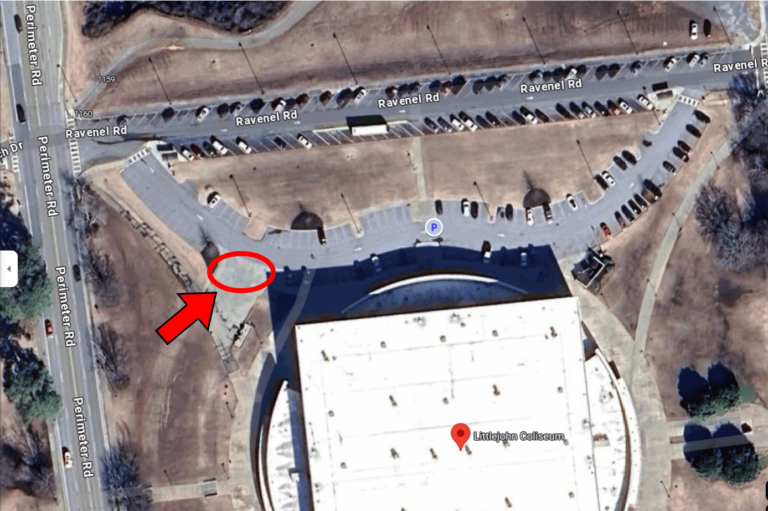
This year’s event will occur in the Littlejohn parking lot between 10 a.m. and 12 p.m. (219 Perimeter Rd, Clemson, SC 29634). Each vehicle is limited to three (3) boxes (copy paper box or smaller) or three (3) bags (kitchen trash bag or smaller). Removing binder clips, binders, paper clips, rubber bands, or staples is unnecessary. The image below shows where the shred truck will be located: 

For more information about this year’s Shred Bowl 360 event, please visit this link. 

Best practices and reminders for Cybersecurity Awareness Month

October is Cybersecurity Awareness Month and is the perfect time to remember best practices and healthy habits to protect yourself and others online. As cybercriminals continue to become more savvy, the Office of Information Security at Clemson University encourages the campus community to remember the following tips and tricks:

  • Stay alert against phishing scams via email. Commonly reported scams include job/internship emails, financial aid opportunities, and student loan payoffs. Always verify the sender’s email address before replying to or clicking on any of the email links. These emails often come from people outside the University, contain a sense of urgency, or pose as someone from a fake department that does not exist on campus. Always forward these emails to phishing@clemson.edu. 
  • Do not replicate passwords. It is recommended that each account has a different, unique password of up to 16 characters. Never share passwords; use a secure password manager to help you keep track. 
  • Update your software. When software companies issue updates for their products, make sure you allow the installation. These updates help correct vulnerabilities or increase safety and are essential. 
  • Use VPN when browsing off campus. Use Clemson’s virtual private network (VPN) to establish a secure connection, as many public networks are not secure and anyone could potentially access what you are working on. 
  • Enable 2-factor authentication (2FA or MFA). Most Clemson resources are secured with DUO mobile for 2FA. There may be options to enable 2FA on non-Clemson accounts as well and this is encouraged as it provides another layer of security to your personal information. 

As always, be extremely careful where you input your login credentials and ensure you verify senders on emails you read via laptop or smartphone. Check out the Cybersecurity Alerts page to learn more about scams directly impacting Clemson University. 

Cybersecurity Operations Center Hosts Open House on October 7

October is Cybersecurity Awareness Month, and cybersecurity plays a critical role at Clemson University. To celebrate, Clemson students and employees have a unique opportunity to visit the Cybersecurity Operations Center (CSOC) in the Watt Family Innovation Center (WFIC) as they host a drop-in open house on Monday, October 7, 2024, from 9 a.m. to 3 p.m. 

This open house will showcase invaluable insights into the critical role the CSOC plays in detecting, monitoring, and negating cybersecurity issues that individuals at Clemson face daily. CSOC staff will show you their state-of-the-art facility and discuss the kinds of work they get to do. Students can also learn from experts about what it takes to enter Cybersecurity as a career, including opportunities for internships in the CSOC, where Clemson students have the ability to take the theory they learned in class and apply it in real-world situations while kickstarting their career.

CSOC Drop-in Open House

Tuesday, October 7, 2024

9 a.m. to 3 p.m.

Watt Family Innovation Center

(Attendees must check in at the WFIC front desk)

Please note: the fourth floor of the WFIC is normally closed off to visitors. To access the CSOC during the open house, check in at the Watt Center front desk on the first floor before being escorted up to the CSOC on the fourth floor.

CCIT This Week: Support Center open during campus closure

Welcome to CCIT This Week, where we give you a rundown of news, tips, upcoming maintenance and more. This page will be updated throughout the week. Follow us on Twitter @ClemsonIT for daily information and timely updates.

News

The CCIT Support Center is available to help. Even during campus closure, our Support Center is open and answering calls, texts and email. Walk-ins are not accepted if campus or Cooper Library is closed.

Learn the Support Center’s hours and get IT help


Upgraded accessibility website and policy guidelines announced.
 Clemson University remains committed to creating an accessible environment for all students, faculty and staff. As part of this commitment, experts across the University worked to build a new website to support accessibility at Clemson and a new policy to conform with federal updates to the Americans with Disabilities Act (ADA).

Learn more about online accessibility at Clemson


Important updates to Smartsheet for Faculty and Staff.
 Clemson University’s Procurement and Business Services informed Smartsheet on August 12, 2024, the University will no longer permit license purchases or renewals of Smartsheet due to Smartsheet’s inability to support accessibility as defined by the Americans with Disabilities Act (ADA).

Learn more about the changes to Smartsheet

Events

Join live a workshop with CCIT Research, Computing and Data! Join the RCD team to expand your knowledge of high-performance computing and research resources available to you! The next workshop on “Machine learning in Python with Clemson HPC” will be Tuesday, Oct. 1 at 1 p.m. Registration is required; open to all Palmetto users.

Learn more and register online

Learn how to deter cheating through effective course design with Clemson Online! Join this training on Wednesday, Oct. 2 at 1:30 p.m. to learn about why students cheat and how to design assignments and courses in Canvas that increase motivation for online students.

Check out the full events calendar from Clemson Online

The popular GIS Fundamentals Workshop Series continues! This Fall, a new curriculum for the GIS Fundamentals Workshops series has been introduced, which promises to empower attendees with the latest state-of-the-art technology accessible through any device. The workshops have been streamlined to cover five critical topics that guarantee coverage of all the GIS fundamentals. The next workshop topic will be “Field Data Collection with GIS” on Friday, Oct. 11. These hybrid workshops are free and open to all Clemson students, faculty, and staff; no previous experience is necessary! Sessions will be delivered online every other Friday from 1:30 to 4:30 p.m. Note: Attendance at the first two workshops is mandatory to participate in the remaining sessions.

Learn more on the Clemson GIS website

September Tech Tip

Print anywhere on campus with PaperCut! PaperCut allows students to print to any of the printers located in public computer areas on campus. Each semester all students are given a quota of funds that can be used for printing and plotting services. More information, including installers and quick start guides for Windows, Mac, iOS and Android, are available by visiting clemson.edu/papercut. 

Upcoming Maintenance

Check out upcoming maintenance events on our CCIT Status Page.

Reminders For Severe Weather IT Preparedness

As hurricane and storm season continues, it is important to remember that being prepared for severe weather also includes protecting your technology. For general preparedness information, ready.gov offers helpful instructions.

Familiarize yourself with Clemson University’s safety information

Clemson University’s Emergency Management offers useful information for natural disasters preparedness and emergencies on campus. Familiarize yourself with some of the modes of communication, including their Emergency Preparedness page. They update their social media with alerts as well (@ClemsonSafety is a good place to start). 

To receive CU Alerts on your phone, follow these instructions CU Alerts are important to stay up to date on any campus or area situations and responses year-round. 

Backup your data

It’s always a good idea to consistently back up your data. As a member of the Clemson community, you have free cloud storage through services like Box and OneDrive. Cloud storage should still be accessible in the event of severe weather at Clemson. Make sure to keep copies of frequently used documents in addition to regular backups.

What happens if Clemson applications are down?

The CCIT status page at status.ccit.clemson.edu is hosted off-site and should remain accessible, as should the CCIT website at ccit.clemson.edu. We will continue to post updates to university systems on the status page with information regarding possible service interruptions, as well as posting updates to the official CCIT Twitter account at @ClemsonIT. We encourage you to subscribe for notifications from the CCIT status page. 

Other general preparedness technology tips

  • Extend the battery life of your devices by:
    • Turning off Wi Fi when not in use.
    • Turning off Bluetooth.
    • Dimming your screen.
    • Turning off push notifications from unnecessary apps.
  • Keep wireless devices charged at all times and keep a back-up battery on hand. Consider car or solar chargers for your devices as well.
  • Keep your devices dry. If you don’t have a waterproof case, Ziploc and similar bags will work well also.
  • Don’t turn your tablet or phone on and off to preserve battery life. Your device will use more energy powering back up than in sleep/rest mode.
  • After the storm and the power is back on, wait until there are no blackouts or surges before plugging your equipment back in. Be sure that critical equipment has an Uninterruptible Power Supply (UPS) attached.

Be aware of cybercriminals

  • After natural disasters, cybercriminals often try to take advantage of those impacted and trying to provide relief efforts. Whether through email or social media, protect yourself against scams and cyberattacks using a few simple tips:
    • Pay attention to the URL of the websites you visit. Malicious websites may look identical to a legitimate site, but the URL may use a variation in spelling or a different domain (for example: .com vs. .net).
    • Be suspicious of unsolicited phone calls, visits, or email messages.
    • Do not reveal personal or financial information in email, and do not respond to email solicitations for this information.
    • Do not follow unsolicited web links in email messages or open any attachments.